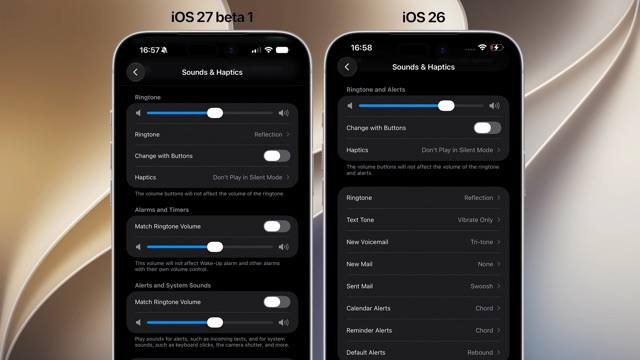
After 19 Years, Users Can Finally Separate Alarm Volume from Notifications

iOS Finally Introduces Independent Alarm Volume Control After 19 Years
Apple has made a significant update to iOS, finally allowing users to control alarm volume independently from other system sounds—a feature that has been requested by users since the original iPhone's launch in 2007. The long-awaited change represents one of the most fundamental audio control updates in the operating system's history.
Revolutionary Volume Control System
For the past 19 years, iOS has used a single volume slider to control all audio outputs, creating frustration for users who wanted to adjust their alarm volume without affecting other system sounds. With the latest update, Apple has implemented a more granular approach to volume control, introducing three distinct sliders:
| Audio Category | Control | Previous Implementation |
|---|---|---|
| Ringtones | Independent volume control | Mixed with all other sounds |
| Alarms and Timers | Independent volume control | Mixed with all other sounds |
| Notifications and System Sounds | Independent volume control | Mixed with all other sounds |
This change addresses a long-standing user experience issue where adjusting the volume for media playback would inadvertently affect alarm loudness, potentially causing users to sleep through important alarms or startle others with suddenly loud notification sounds.
Enhanced Lock Screen Customization
Beyond the volume control changes, iOS introduces new customization options for the lock screen, including:
- Oversized widgets that provide more information at a glance
- Very small clock options for users who prefer minimal lock screen elements
These additions expand upon the existing widget system introduced in previous iOS versions, offering users greater flexibility in personalizing their device's home screen and lock screen interfaces.
Design Philosophy
The new oversized widgets follow Apple's design language of providing clear, readable information while maintaining aesthetic consistency. The expanded widget area allows for more detailed information display without requiring users to unlock their devices or open specific applications.
macOS 27 Enhances iPhone Mirroring
Alongside iOS updates, macOS 27 introduces improvements to iPhone Mirroring, a feature that allows users to control their iPhone from their Mac. The update provides a wider window for the iPhone Mirroring interface, offering a more desktop-like experience when managing iPhone functions from a Mac computer.
This enhancement reflects Apple's continued efforts to create seamless integration between its ecosystem devices, enabling more fluid workflows for users who switch between iPhone and Mac throughout their day.
User Reactions and Industry Impact
The introduction of independent alarm volume control has been met with widespread approval from long-time iOS users, many of whom have expressed frustration with the limitation over the years. The feature addresses one of the most frequently requested iOS improvements, demonstrating Apple's responsiveness to user feedback.
Industry analysts note that while the change may seem minor, it represents a significant quality-of-life improvement that aligns with Apple's philosophy of refining existing features to enhance the overall user experience.
Technical Implementation
The volume control system rearchitecture required changes to iOS's core audio framework, which previously treated all system sounds as a single output category. The new implementation separates audio outputs at the system level, allowing for more granular control while maintaining system stability and performance.
Apple engineers have worked to ensure that the new volume controls integrate seamlessly with existing accessibility features, including vibration patterns and visual alerts, creating a comprehensive audio customization system for all users.
Conclusion
These updates to iOS and macOS demonstrate Apple's commitment to refining its operating systems based on user feedback and evolving usage patterns. The 19-year wait for independent alarm volume control highlights how even fundamental features can be improved with thoughtful design and implementation.
As Apple continues to develop its ecosystem, these enhancements to audio control, widget customization, and cross-device integration represent the company's ongoing efforts to create a more cohesive and user-friendly experience across its product line.
⏱️ It took 19 years to be able to adjust alarm volume separately from notifications iOS 🍎 finally lets you control alarm volume independently from other sounds. Until now, iOS used a single volume slider for everything. Now there are separate sliders: one for ringtones, one for alarms and timers, and one for notifications and system sounds. iOS 🍎 also brings oversized widgets and very small clock options on the lock screen, while macOS 27 gets a wider window for iPhone Mirroring. #iOS @DailyApple ⏱️ It took 19 years to be able to adjust alarm volume separately from notifications iOS 🍎 finally lets you control alarm volume independently from other sounds. Until now, iOS used a single volume slider for everything. Now there are separate sliders: one for ringtones, one for alarms and timers, and one for notifications and system sounds. iOS 🍎 also brings oversized widgets and very small clock options on the lock screen, while macOS 27 gets a wider window for iPhone Mirroring. #iOS @DailyApple
TechOffice