 TechOffice
三星Galaxy S26 One UI 9 Beta 3更新日志:新功能与重大改进全解析
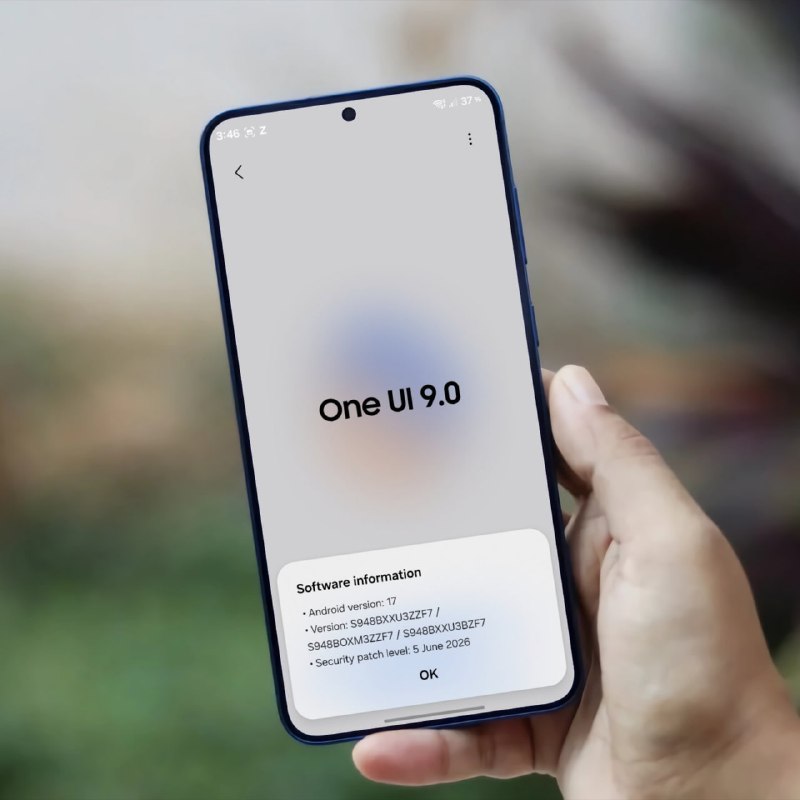
Galaxy S26 One UI 9 Beta 3 Brings Comprehensive Improvements and Fixes
Introduction
The Samsung Galaxy S26 is on the horizon, and with it comes the next iteration of Samsung's custom Android skin, One UI 9. Samsung has been steadily rolling out beta versions of the new software, and the third beta release (version ZZF7) brings a substantial list of bug fixes and improvements. This update demonstrates Samsung's commitment to refining the user experience before the official launch, addressing issues across the camera, user interface, system stability, and more.
One UI 9 Beta 3 Overview
The third beta build of One UI 9 for the upcoming Galaxy S26 represents a significant step in the software development process. With version number ZZF7, this release continues Samsung's tradition of iterative improvements through beta testing programs. The changelog, shared by tipster tarunvats via the @OneUIForGalaxy account, reveals that Samsung has been working on refining various aspects of the user experience, from camera performance to system stability.
Detailed Bug Fixes and Improvements
One UI 9 Beta 3 introduces a comprehensive set of fixes that target specific user-reported issues. These improvements can be categorized into several key areas, each addressing different aspects of the smartphone experience.
Table: One UI 9 Beta 3 Fixes by Category
| Category | Issue Description | Improvement |
|---|---|---|
| Privacy | Errors related to privacy display when setting routines or toggling Quick Panel | Improved error handling and display |
| Camera | Camera preview screen cropped under certain conditions | Fixed preview cropping issue |
| Widgets | Weather and battery widgets on lock screen not updating | Corrected widget update mechanism |
| Camera | Poor focus accuracy at 30x zoom | Enhanced focus precision |
| UI/UX | Home screen not swipeable when using S Pen | Fixed S Pen gesture recognition |
| File Management | My Files app unable to scroll to end of file list | Corrected scrolling functionality |
| Phone Calls | Background screen intermittently turns white during calls | Fixed display rendering issue |
| System Stability | Device reboots during video streaming | Improved system stability |
| UI/UX | Background appears black when pulling down status bar | Fixed status bar rendering |
Camera Improvements
The camera system remains a focal point for Samsung, and Beta 3 addresses two important camera-related issues. First, Samsung has fixed a problem where part of the camera preview screen would be cropped under certain conditions. This fix ensures that users can compose their shots accurately without unexpected cropping.
Second, the beta improves focus accuracy when using the 30x zoom feature. High zoom levels often struggle with maintaining focus, but this enhancement should provide more precise focusing capabilities when capturing distant subjects. These improvements suggest that Samsung is continuing to refine the computational photography capabilities of the Galaxy S26, potentially indicating enhanced telephoto performance in the final release.
UI/UX Enhancements
User interface and experience improvements constitute a significant portion of the fixes in One UI 9 Beta 3. Samsung has addressed issues with the home screen swipe functionality when using the S Pen, ensuring that pen input works seamlessly with navigation gestures. This is particularly important for Galaxy Note and S Pen Pro users who rely on the stylus for productivity tasks.
Additionally, the fix for the black background when pulling down the status bar and the white background issue during calls indicate that Samsung is working on display rendering consistency. These seemingly minor visual glitches can detract from the premium user experience that Samsung aims to deliver with its flagship devices.
System Stability and Performance
System stability is a critical aspect of any smartphone experience, and Beta 3 includes fixes for reboot issues during video streaming. This type of fix is particularly important as it addresses a potential data loss or disruption scenario that users might encounter while consuming media.
The fix for the My Files app's inability to scroll to the end of file lists demonstrates Samsung's attention to detail in productivity features. As users increasingly rely on their smartphones for file management and productivity tasks, ensuring smooth performance in these core applications becomes increasingly important.
Privacy and Security
The improvement in privacy display errors when setting routines or toggling the Quick Panel shows Samsung's continued focus on privacy features. One UI has progressively incorporated more privacy controls and indicators, and this fix ensures that these features function as intended. The Quick Panel, in particular, provides quick access to various settings and features, so ensuring its proper functioning is essential for user convenience.
What This Means for Users
The comprehensive nature of the fixes in One UI 9 Beta 3 suggests that Samsung is nearing a stable release candidate for the final version. The address of both major and minor issues indicates a commitment to delivering a polished user experience with the Galaxy S26.
For users participating in the beta program, these improvements should translate to a more stable and refined experience. The camera fixes, in particular, may provide a glimpse of the enhanced photography capabilities that Samsung might highlight in the final marketing for the device.
The widget and lock screen fixes demonstrate that Samsung is paying attention to personalization aspects of the user experience. Weather and battery widgets are frequently used features, so ensuring their proper functioning is important for daily usability.
Conclusion and What to Expect Next
One UI 9 Beta 3 represents a significant step forward in the development of Samsung's next-generation software for the Galaxy S26. The wide range of fixes across different system components shows a holistic approach to refining the user experience.
As Samsung continues the beta program, we can expect additional refinements in subsequent builds. The company typically addresses the most critical issues first, followed by more nuanced improvements as the software matures. Based on the pattern of previous One UI releases, we can anticipate that the final version of One UI 9 will be even more polished than what we see in Beta 3.
The Galaxy S26, paired with One UI 9, is shaping up to be a significant update for Samsung's flagship lineup. With improvements to camera performance, system stability, and user interface elements, Samsung appears committed to delivering a premium experience that builds upon the strengths of its predecessors while addressing user feedback and pain points.
As we approach the expected launch of the Galaxy S26, the continued refinement of One UI 9 through beta releases suggests that Samsung is taking a careful approach to ensure that its next flagship software is as polished and feature-rich as possible. Users who value both cutting-edge features and a refined, stable user experience will likely have much to look forward to when the device and software officially debut.
Galaxy S26 One UI 9 Beta 3 Changelog! Version - One UI 9, ZZF7 Bugs that have been fixed: - Improved errors related to the privacy display when setting routines or toggling the Quick Panel ON/OFF. - Fixed an issue where part of the camera preview screen was cropped under certain conditions. - Fixed an issue where widget information, such as weather and battery on the lock screen, was not updating correctly. - Improved focus accuracy when using 30x camera zoom. - Fixed an issue where the home screen would not swipe left or right when using the pen. - Fixed an issue in the My Files app where the file list could not be scrolled to the end. - Fixed an issue where the background screen would intermittently turn white when receiving a call. - Fixed an issue where the device would reboot once during video streaming. - Fixed an issue where the background would appear black when pulling down the status bar. via: tarunvats ❤️ @OneUIForGalaxy Galaxy S26 One UI 9 Beta 3 Changelog! Version - One UI 9, ZZF7 Bugs that have been fixed: - Improved errors related to the privacy display when setting routines or toggling the Quick Panel ON/OFF. - Fixed an issue where part of the camera preview screen was cropped under certain conditions. - Fixed an issue where widget information, such as weather and battery on the lock screen, was not updating correctly. - Improved focus accuracy when using 30x camera zoom. - Fixed an issue where the home screen would not swipe left or right when using the pen. - Fixed an issue in the My Files app where the file list could not be scrolled to the end. - Fixed an issue where the background screen would intermittently turn white when receiving a call. - Fixed an issue where the device would reboot once during video streaming. - Fixed an issue where the background would appear black when pulling down the status bar. via: tarunvats ❤️ @OneUIForGalaxy


