 TechOffice
After 19 Years, Users Finally Gain Control Over Alarm Volume Separate From Notifications
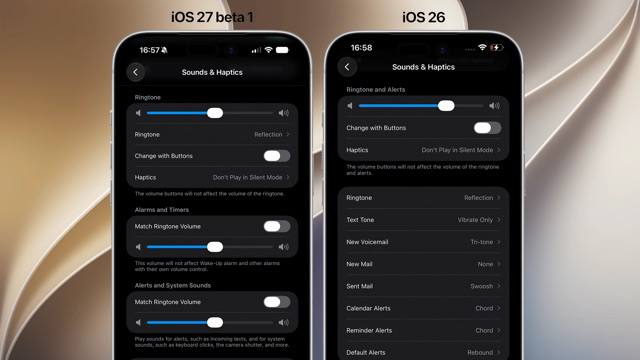
iOS Finally Introduces Independent Alarm Volume Control After 19 Years
Apple's latest iOS update marks a significant milestone in the platform's evolution by finally allowing users to control alarm volume independently from other system sounds. This seemingly simple feature, requested by users for nearly two decades, represents a substantial improvement in user experience and customization options.
The Long-Awaited Volume Control Revolution
For 19 years, iOS has relied on a single volume slider that controlled all system sounds uniformly. This approach, while simple, created frustration for users who wanted to adjust their alarm volume without affecting ringtones, notifications, or media playback. The introduction of separate volume controls represents a fundamental shift in how Apple manages system audio.
The update introduces three distinct volume sliders:
- Ringtones - Controls the volume for incoming call alerts
- Alarms and Timers - Specifically adjusts the volume for alarm sounds and timer alerts
- Notifications and System Sounds - Manages volume for app notifications, system alerts, and other UI sounds
Volume Control Evolution
The following table illustrates the progression of iOS volume control capabilities:
| iOS Version | Volume Control Features | User Customization |
|---|---|---|
| Initial iOS (2007) | Single volume slider for all sounds | Basic adjustment only |
| iOS 7 (2013) | Single volume slider with separate silent/ring switch | Toggle between silent and ring modes |
| iOS 11 (2017) | Single volume slider with haptic feedback controls | Added haptic intensity adjustment |
| iOS 16 (2022) | Single volume slider with focus modes | Volume adjustments based on selected focus mode |
| Latest iOS (2024) | Three separate volume sliders for different sound categories | Fine-tuned control for each sound category |
iOS Lock Screen Enhancements
Beyond the volume control improvements, the latest iOS update introduces significant enhancements to the lock screen experience. Users can now choose from oversized widgets that provide more information at a glance, making it easier to check important details without unlocking their devices.
Additionally, Apple has introduced very small clock options for users who prefer a more minimalistic lock screen design. This customization option caters to varying aesthetic preferences and use cases, allowing users to tailor their lock screen to their specific needs.
Widget Size Options
| Widget Size | Information Displayed | Best Use Cases |
|---|---|---|
| Small | Basic information, minimal design | Minimalist users, quick glance information |
| Medium | Standard information with some detail | Balanced information display |
| Oversized | Comprehensive information with rich details | Users who want maximum information at a glance |
macOS 27 Enhances iPhone Mirroring
Alongside iOS improvements, macOS 27 introduces a wider window for iPhone Mirroring, enhancing the integration between Apple's desktop and mobile platforms. This feature allows users to view and interact with their iPhone screen directly on their Mac, providing a more seamless cross-device experience.
The expanded window size in iPhone Mirroring provides users with more screen real estate to interact with their iPhone applications, making it easier to perform tasks that benefit from a larger viewing area. This enhancement is particularly valuable for productivity-focused users who frequently switch between their iPhone and Mac.
iPhone Mirroring Features Comparison
| Feature | Previous Version | |
|---|---|---|
| Window Size | Standard iPhone aspect ratio | Wider window with adjustable dimensions |
| Interaction Method | Basic touch simulation | Enhanced touch simulation with improved responsiveness |
| File Transfer | Basic drag-and-drop | Advanced file management with preview capabilities |
| Notification Handling | Standard notification display | Interactive notifications with direct response capability |
User Experience Implications
The introduction of independent volume controls represents a significant improvement in user experience, particularly for those who have been frustrated by the limitations of the previous system. The ability to set different volume levels for alarms versus notifications allows for more personalized device usage patterns.
Oversized widgets on the lock screen provide users with more information at a glance, potentially reducing the need to unlock devices frequently for simple information checks. The small clock option appeals to users who prefer a cleaner, more minimalistic interface.
The enhanced iPhone Mirroring in macOS 27 bridges the gap between mobile and desktop computing, creating a more cohesive ecosystem where users can seamlessly transition between devices based on their current task or location.
Conclusion
Apple's latest iOS and macOS updates demonstrate a renewed focus on user customization and experience refinement. The 19-year wait for independent alarm volume control highlights how even seemingly small features can have a significant impact on daily device usage.
These improvements collectively enhance the user experience by providing greater control, more information display options, and tighter integration between devices. As Apple continues to evolve its operating systems, we can expect further refinements that address long-standing user requests while introducing innovative new features.
The combination of these updates reinforces Apple's commitment to creating a cohesive, user-friendly ecosystem where devices work together seamlessly while offering increasingly granular control over customization options.
⏱️ It took 19 years to be able to adjust alarm volume separately from notifications iOS 🍎 finally lets you control alarm volume independently from other sounds. Until now, iOS used a single volume slider for everything. Now there are separate sliders: one for ringtones, one for alarms and timers, and one for notifications and system sounds. iOS 🍎 also brings oversized widgets and very small clock options on the lock screen, while macOS 27 gets a wider window for iPhone Mirroring. #iOS @DailyApple ⏱️ It took 19 years to be able to adjust alarm volume separately from notifications iOS 🍎 finally lets you control alarm volume independently from other sounds. Until now, iOS used a single volume slider for everything. Now there are separate sliders: one for ringtones, one for alarms and timers, and one for notifications and system sounds. iOS 🍎 also brings oversized widgets and very small clock options on the lock screen, while macOS 27 gets a wider window for iPhone Mirroring. #iOS @DailyApple


