 TechOffice
Galaxy Z Fold7 Receives One UI 8.5 June Update Across India and European Markets
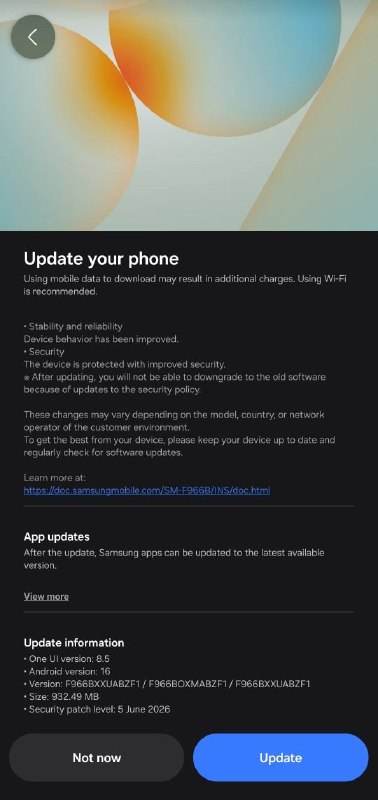
Samsung Rolls Out One UI 8.5 June Update for Galaxy Z Fold7 with Enhanced Notification Management and File Summarization
Samsung has commenced the rollout of its One UI 8.5 June update for the highly anticipated Galaxy Z Fold7 in select markets across India and Europe. The update, carrying the build version F966BXXUABZF1, introduces several notable enhancements designed to improve user experience and productivity on the company's flagship foldable device.
Overview of the Galaxy Z Fold7 and One UI 8.5
The Galaxy Z Fold7 represents Samsung's latest innovation in foldable technology, featuring a sophisticated design that combines premium materials with cutting-edge display technology. As part of Samsung's commitment to continuous improvement, the One UI 8.5 operating system brings refined functionality and new capabilities to enhance the user experience.
One UI 8.5, Samsung's custom Android-based interface, is specifically designed to take advantage of the unique form factors of Samsung's devices, particularly the multi-screen experience offered by the Galaxy Z Fold7. The June update builds upon previous versions by introducing features that streamline daily tasks and improve device usability.
Key Features Introduced in the June Update
1. Prioritize and Summarize Notifications
One of the most significant additions in this update is the enhanced notification management system. The new "Prioritize and Summarize Notifications" feature employs advanced AI algorithms to intelligently sort and condense incoming notifications based on their importance and relevance to the user.
This functionality automatically categorizes notifications into different priority levels, ensuring that important alerts from specific contacts or applications receive immediate attention while less critical information is grouped together. Users can customize these priority settings to match their individual preferences and workflow patterns.
The summarization aspect condenses lengthy notification threads into concise overviews, allowing users to quickly understand the content without having to open each notification individually. This is particularly useful for busy professionals who need to stay informed without being constantly interrupted by their devices.
2. Show File Summaries
The second major feature introduced in this update is the "Show File Summaries" capability, which leverages Samsung's AI technology to provide instant previews and summaries of various file types directly from the file manager or supported applications.
This feature supports a wide range of file formats, including documents, images, and even some video content. When a user selects a file, the system generates a concise summary that highlights key information, allowing for quick content assessment without fully opening the file.
For documents, the AI extracts key points, headings, and important information. For images, it can identify objects, people, and text within the image. This functionality significantly improves productivity by enabling users to quickly locate and review specific content within large collections of files.
Update Details and Rollout Information
The One UI 8.5 June update for the Galaxy Z Fold7 is being rolled out gradually, with devices in India and Europe among the first to receive it. The update carries the build number F966BXXUABZF1 and is approximately 1.2GB in size, depending on the device's previous software version.
Samsung typically releases software updates in a phased manner, starting with a limited number of units to identify and address any potential issues before a wider rollout. Users who have not yet received the notification may need to wait a few additional days as the update becomes more widely available.
To check for the update manually, users can navigate to Settings > Software update > Download and install. It is recommended to connect to a stable Wi-Fi network and ensure the device has sufficient battery (or is charging) before initiating the update process.
Technical Specifications and Improvements
Beyond the headline features, the One UI 8.5 June update includes several under-the-hood improvements that enhance device performance, security, and stability:
| Category | Improvements |
|---|---|
| Security | Monthly security patch for June 2024 with fixes for critical vulnerabilities |
| Performance | Optimized app launch times and improved multitasking capabilities |
| Display | Enhanced color accuracy and brightness calibration for internal and external displays |
| Battery | Improved power management algorithms to extend battery life |
| Camera | Refined image processing and improved low-light photography |
Comparison with Previous One UI Versions
One UI 8.5 builds upon the foundation established in earlier versions, with particular attention to the unique needs of foldable device users. Compared to One UI 8.0 and 8.1, this update introduces more sophisticated AI-powered features and improved optimization for the Galaxy Z Fold7's dual-display configuration.
The notification management system represents a significant evolution from previous versions, offering more granular control and better AI-driven categorization. Similarly, the file summarization feature showcases Samsung's continued investment in AI capabilities that enhance productivity.
User Experience and Productivity Enhancements
The features introduced in this update are particularly well-suited to the Galaxy Z Fold7's form factor. The ability to prioritize notifications helps users manage the increased information flow that comes with a larger display, while the file summaries feature leverages the additional screen real estate for more efficient content review.
These improvements align with Samsung's broader strategy of developing software that takes full advantage of hardware capabilities, creating a seamless and intuitive user experience that adapts to different usage scenarios.
Future Update Roadmap
While the June update brings valuable new features, Samsung is already working on subsequent releases for the Galaxy Z Fold7. The company typically follows a monthly update schedule with smaller feature additions and improvements, alongside major quarterly updates that introduce more substantial changes.
Future updates may include further AI-powered features, enhanced multitasking capabilities, and improvements to the multitasking interface that takes advantage of the device's foldable design. Samsung has also indicated continued focus on optimizing its applications for the larger display format.
Conclusion
The One UI 8.5 June update for the Galaxy Z Fold7 represents Samsung's commitment to continuously improving its flagship foldable device experience. With the introduction of intelligent notification management and file summarization capabilities, Samsung addresses key productivity challenges while maintaining the polished user experience that has become synonymous with the One UI ecosystem.
As foldable technology continues to evolve, Samsung's focus on developing software that fully leverages the unique capabilities of these devices positions the company at the forefront of innovation in the mobile space. Users in India and Europe with the Galaxy Z Fold7 can now enjoy these enhancements, with wider availability expected in the coming days.
The update demonstrates Samsung's understanding that hardware innovation must be matched by thoughtful software design to create a truly exceptional user experience. As more users adopt foldable devices, features like those introduced in this update will become increasingly important in differentiating the user experience and driving mainstream adoption of this form factor.
Samsung has released the One UI 8.5 June update for the Galaxy Z Fold7 in India and Europe with build version F966BXXUABZF1 yesterday. What's new: - Prioritize and Summarize Notifications - Show File Summaries via: tarunvats ❤️ @OneUIForGalaxy Samsung has released the One UI 8.5 June update for the Galaxy Z Fold7 in India and Europe with build version F966BXXUABZF1 yesterday. What's new: - Prioritize and Summarize Notifications - Show File Summaries via: tarunvats ❤️ @OneUIForGalaxy


