 TechOffice
Tech Industry Ends 19-Year Wait with Independent Alarm Volume Control
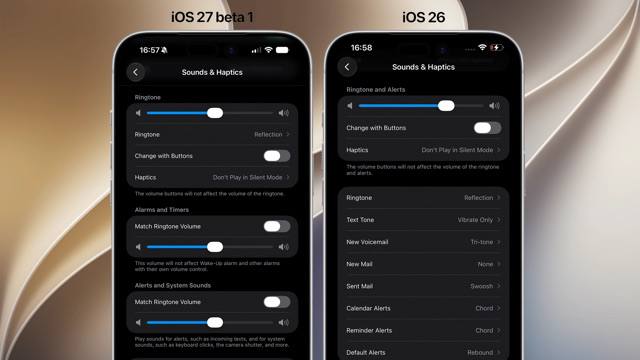
iOS Finally Introduces Independent Alarm Volume Control After 19 Years
In a significant update that addresses one of the most longstanding user complaints, Apple has finally implemented independent volume controls for alarms and notifications in iOS. This fundamental change comes nineteen years after the original iPhone was introduced, marking a notable evolution in the operating system's audio customization capabilities.
The Evolution of iOS Volume Controls
For nearly two decades, iOS has used a single volume slider to control all system sounds, creating frustration for users who wanted to adjust alarm volume without affecting notification sounds or vice versa. This limitation became particularly problematic in situations where users needed their alarms to be loud enough to wake them up but preferred notifications to be more subtle.
With the latest iOS update, Apple has introduced a more granular approach to audio control, providing users with three distinct volume sliders:
- Ringtones - for incoming call sounds
- Alarms and Timers - specifically for alarm clock sounds and timer alerts
- Notifications and System Sounds - for app notifications, keyboard clicks, and other system audio feedback
iOS Lock Screen Enhancements
Beyond the volume control improvements, iOS introduces several notable enhancements to the lock screen experience. These updates reflect Apple's continued focus on personalization and user interface refinement:
- Oversized Widgets - Users can now place larger widgets on their lock screen for improved visibility and easier interaction
- Compact Clock Options - New minimal clock designs allow for a less intrusive time display when users prefer a cleaner look
macOS 27 Enhances iPhone Mirroring
Complementing the iOS updates, macOS 27 introduces improvements to iPhone Mirroring functionality. The most notable change is a wider window for displaying the mirrored iPhone interface on Mac computers. This enhancement provides users with a more immersive and usable experience when accessing their iPhone content on a larger screen.
User Experience Implications
The introduction of independent volume controls represents more than just a technical improvement—it addresses a fundamental user need that has gone unmet for years. This change is particularly valuable for:
- Users who sleep with their phones nearby but want to be awakened by loud alarms while keeping notification sounds quiet
- Professionals who need to distinguish between important alerts and routine notifications
- Accessibility-conscious users who may require different volume levels for different types of alerts
Comparing Before and After
| Feature | Previous iOS Implementation | New iOS Implementation |
|---|---|---|
| Volume Control | Single slider controlling all sounds | Three separate sliders for different sound categories |
| Alarm Volume | Adjusted with general volume slider | Independent control via dedicated slider |
| Lock Screen Widgets | Standard sized widgets only | Oversized widgets available for better visibility |
| Display Options | Limited clock customization |
Technical Implementation Details
From a technical perspective, the independent volume control system represents a significant architectural change in iOS. Previously, the operating system utilized a single audio session for all system sounds, making it impossible to differentiate between alarm and notification volumes at the system level.
The new implementation leverages multiple audio sessions, allowing for more granular control over different types of alerts. This architectural change not only enables the volume separation but also opens the door for future audio customization enhancements.
Industry Context and User Response
This update arrives amid growing competition in the mobile operating system space, where Android and other platforms have long offered more granular audio controls. The change demonstrates Apple's willingness to evolve its interface design based on user feedback, even for features that have remained unchanged for nearly two decades.
Early user responses to the update have been overwhelmingly positive, with many expressing relief at finally being able to customize alarm and notification volumes independently. The lock screen enhancements have also been well-received, with users appreciating the increased flexibility in personalizing their devices.
Looking Ahead
The introduction of independent volume controls and lock screen enhancements suggests that Apple will continue to focus on personalization and user experience improvements in future updates. The technical foundation laid by this change may enable even more sophisticated audio customization options in future iOS releases.
As users become accustomed to these new features, it's likely that Apple will further refine the volume control system and expand the customization options available for different types of alerts and system sounds.
Conclusion
After nineteen years of using a single volume slider for all system sounds, iOS users can finally customize their alarm and notification volumes independently. This long-awaited improvement, combined with the new lock screen customization options and enhanced iPhone Mirroring in macOS 27, represents a significant step forward in user experience and interface design for Apple's ecosystem.
These changes demonstrate Apple's commitment to evolving its operating systems based on user needs, addressing fundamental limitations while introducing new possibilities for personalization and control. As users begin to explore these new features, the impact on daily device interaction is likely to be substantial, particularly for those who have long struggled with the one-size-fits-all approach to volume control.
⏱️ It took 19 years to be able to adjust alarm volume separately from notifications iOS 🍎 finally lets you control alarm volume independently from other sounds. Until now, iOS used a single volume slider for everything. Now there are separate sliders: one for ringtones, one for alarms and timers, and one for notifications and system sounds. iOS 🍎 also brings oversized widgets and very small clock options on the lock screen, while macOS 27 gets a wider window for iPhone Mirroring. #iOS @DailyApple ⏱️ It took 19 years to be able to adjust alarm volume separately from notifications iOS 🍎 finally lets you control alarm volume independently from other sounds. Until now, iOS used a single volume slider for everything. Now there are separate sliders: one for ringtones, one for alarms and timers, and one for notifications and system sounds. iOS 🍎 also brings oversized widgets and very small clock options on the lock screen, while macOS 27 gets a wider window for iPhone Mirroring. #iOS @DailyApple


