 TechOffice
Apple Unveils iOS 27 Beta 2: Developers Gain Early Access to Next-Generation Mobile Features
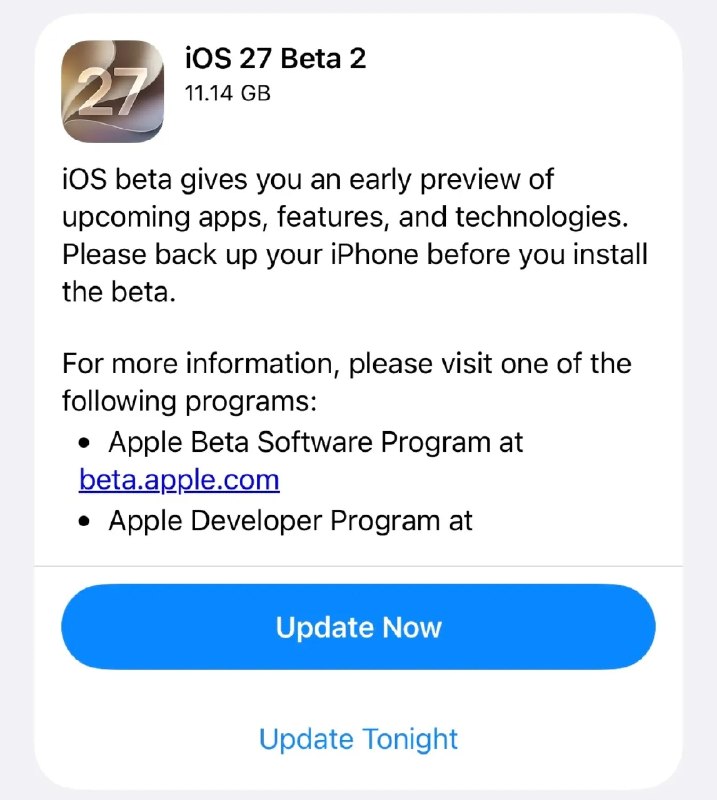
Apple Releases iOS 27 Beta 2: New Features, Improvements, and Developer Insights
Apple has officially released the second beta version of iOS 27, bringing forth a range of new features, enhancements, and bug fixes to its upcoming mobile operating system. The release marks another significant milestone in the development cycle of what promises to be one of the most substantial updates to iOS in recent years.
What is iOS 27 Beta 2?
iOS 27 beta 2 is the second iteration of Apple's upcoming mobile operating system, designed primarily for developers and advanced users to test new features, provide feedback, and identify potential issues before the public release. This beta build follows the initial developer release of iOS 27 beta, which was made available shortly after Apple's Worldwide Developers Conference (WWDC) in June.
As with all beta releases, iOS 27 beta 2 is not intended for general consumption and may contain bugs, performance issues, or incomplete features. Apple recommends that only developers and experienced users install the beta on non-primary devices to avoid potential data loss or instability.
Key Features and Changes in iOS 27 Beta 2
The second beta of iOS 27 introduces several notable improvements and new features that were either not fully implemented or not present in the initial beta release. Here are the most significant changes:
Enhanced AI and Machine Learning Capabilities
iOS 27 continues Apple's focus on artificial intelligence with several AI-powered enhancements:
- Improved Siri integration with third-party apps, allowing for more contextual and proactive assistance
- Advanced on-device machine learning models for better photo organization and search
- Smaller, more efficient AI models that maintain functionality while reducing device resource consumption
- New privacy-preserving AI features that process sensitive data locally rather than in the cloud
Revamped Control Center
The Control Center receives a significant redesign in iOS 27 beta 2, featuring:
- A more modular and customizable interface with drag-and-drop functionality
- Expanded widget support for greater information at a glance
- Improved contextual awareness, showing relevant controls based on usage patterns
- Enhanced haptic feedback for tactile interactions
Updated Privacy and Security Features
Apple continues to prioritize user privacy with several new security measures:
- Enhanced App Tracking Transparency controls with more granular options
- New privacy reports that provide detailed insights into app data usage
- Improved password monitoring with broader breach detection
- Enhanced Face ID and Touch ID security protocols
Performance and Battery Life Improvements
iOS 27 beta 2 introduces several optimizations aimed at improving device performance:
- More efficient background app management to reduce battery drain
- Improved memory management for better multitasking performance
- Enhanced power efficiency for supported devices
- Reduced animation stutter in system animations and games
Visual Enhancements
The second beta brings several visual improvements to the iOS interface:
- Refined animations and transitions for a smoother user experience
- Updated system icons with a more consistent design language
- Enhanced dark mode with better contrast and color accuracy
- New wallpaper options with dynamic elements that respond to device movement
App Updates and New Functionality
Several built-in apps receive significant updates in iOS 27 beta 2:
- Messages: Enhanced group chat features, improved search functionality, and new media sharing options
- Photos: Advanced editing tools, better organization features, and improved sharing capabilities
- Weather: More detailed forecasts, interactive maps, and severe weather alerts
- Health: Expanded tracking options, new data visualization tools, and improved sharing with healthcare providers
- Maps: Enhanced transit directions, improved EV routing with charging station integration, and more detailed 3D maps
Installation Guide for Developers
For developers interested in installing iOS 27 beta 2, Apple provides several methods:
- Over-the-Air Update:
- Ensure your device is enrolled in the Apple Developer Program
- Go to Settings > General > Software Update
- Select the iOS 27 beta 2 update and follow the on-screen instructions
- Using Xcode:
- Download and install the latest version of Xcode
- Connect your iPhone or iPad to your Mac
- Select your device in Xcode and choose "iOS 27 beta" from the run destination menu
- Click the "Run" button to install the beta
- Using Configuration Profiles:
- Download the appropriate configuration profile from the Apple Developer website
- Install the profile on your device
- Restart your device when prompted
- Check for updates in Settings > General > Software Update
Known Issues and Bugs
As with any beta release, iOS 27 beta 2 contains several known issues that Apple is working to resolve:
| Category | Known Issues |
|---|---|
| General | Occasional app crashes during startup; reduced battery life in some scenarios; occasional system lag after prolonged use |
| Camera | Flash may not work properly in low-light conditions; Night mode may exhibit inconsistent performance |
| Connectivity | Wi-Fi connectivity issues in some environments; Bluetooth pairing instability with certain accessories |
| Applications | Some third-party apps may crash or behave unexpectedly; Widgets may not display correctly on the Home Screen; iCloud sync issues with certain types of data |
Comparison with Previous Beta
iOS 27 beta 2 introduces several improvements and changes compared to the first beta release:
| Feature/Aspect | iOS 27 Beta 1 | iOS 27 Beta 2 | Changes |
|---|---|---|---|
| Control Center | Initial redesign with limited customization | Enhanced with drag-and-drop and widget support | Improved customization options and more responsive interactions |
| Siri | Basic third-party app integration | Enhanced contextual awareness and proactive features | More natural interactions and better app integration |
| Performance | Noticeable lag in animations and transitions | Smoother animations and improved response times | Better optimization and reduced resource consumption |
| Privacy Features | Basic App Tracking Transparency | Enhanced controls and detailed privacy reports | More granular user control over data sharing |
| Battery Life | Reduced battery efficiency in some scenarios | Improved power management and efficiency | Better battery optimization and reduced background activity |
Expected Timeline for Official Release
Based on Apple's typical release schedule, the following timeline can be expected for iOS 27:
- September: Apple typically releases the final version of iOS alongside new iPhone models at their annual fall event
- August: Several additional beta releases are expected before the final version
- July: Public beta release for non-developers to test the software
- June-September: Multiple developer beta releases to refine features and fix bugs
Given that iOS 27 beta 2 has just been released, Apple is likely on track for this traditional timeline, though the exact dates may vary depending on the development progress and any significant issues discovered during testing.
Impact on Users and Developers
For Users
The release of iOS 27 beta 2 signals that Apple is making steady progress toward the final release, which will bring significant improvements to user experience, privacy, and performance. Users can look forward to:
- A more intuitive and customizable interface with the revamped Control Center
- Enhanced privacy controls that give users more control over their data
- Improved performance and battery life across supported devices
- New features in built-in apps that enhance productivity and entertainment
For Developers
For developers, iOS 27 beta 2 provides an opportunity to:
- Test their apps against the latest API changes and system updates
- Optimize their applications for the new Control Center design
- Implement new AI and machine learning features that leverage on-device processing
- Ensure compatibility with the latest privacy and security requirements
- Prepare for the public release by addressing any compatibility issues early
Conclusion
The release of iOS 27 beta 2 represents another important step in Apple's development of its next-generation mobile operating system. With a focus on AI enhancements, privacy improvements, and performance optimizations, this beta demonstrates Apple's commitment to refining the user experience while maintaining its emphasis on security and efficiency.
As the development cycle continues, users and developers can expect further refinements and new features to be introduced in subsequent beta releases. The final version of iOS 27, expected this fall, will likely build upon the foundation established in these early betas to deliver a polished and feature-rich update to Apple's mobile ecosystem.
For those interested in testing the latest features, iOS 27 beta 2 is now available through Apple's developer channels, though caution is advised given that this is pre-release software not intended for everyday use.
Apple has released iOS 27 beta 2 🚨 Apple has released iOS 27 beta 2 🚨


