 TechOffice
19 Years Later: Smartphone Makers Finally Allow Separate Alarm and Notification Volume Control
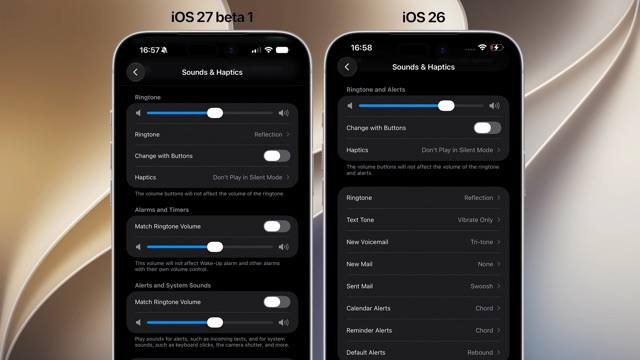
iOS Finally Introduces Independent Alarm Volume Control After 19 Years
In a long-awaited update that addresses one of the most persistent user experience complaints, Apple has finally implemented separate volume controls for alarms and notifications in iOS. This fundamental change comes 19 years after the original iPhone was released, marking a significant evolution in the operating system's audio management capabilities.
A Revolutionary Change to iOS Audio Controls
For nearly two decades, iOS has utilized a single volume slider to control all system sounds, creating frustration for users who wanted to adjust alarm volume without affecting notification sounds or media playback. This limitation has been a point of contention among iPhone and iPad users, with countless feature requests submitted to Apple over the years.
The latest iOS update introduces a refined audio control system with three distinct sliders:
- Ringtones and alerts - For incoming call sounds and other alert tones
- Alarms and timers - Specifically for alarm clock sounds and timer alerts
- Notifications and system sounds - For app notifications, system chimes, and other UI feedback
Comparing Old vs. New Volume Control Systems
| Feature | Previous iOS System | New iOS System |
|---|---|---|
| Volume Control Method | Single slider controlling all audio | Three separate sliders for different audio categories |
| Alarm Volume Adjustment | Required changing master volume, affecting all sounds | Dedicated slider for alarms and timers only |
| User Customization | Limited to on/off and master volume | Granular control over multiple sound categories |
| Implementation Timeline | Single approach since 2007 | Introduced in 2026 after 19 years |
Additional iOS Lock Screen Enhancements
Beyond the volume control overhaul, the latest iOS update brings several notable improvements to the lock screen experience, further enhancing user customization options.
Oversized Widgets
Apple has introduced the ability to display significantly larger widgets on the lock screen, allowing users to view more information at a glance. These expanded widgets can display detailed weather forecasts, comprehensive calendar events, larger music controls, and more, reducing the need to unlock the device for quick information retrieval.
Compact Clock Options
In a complementary update to the oversized widgets, iOS now offers very small clock options for users who prefer minimal lock screen real estate. These compact clock displays can be positioned strategically to maximize space for widgets and notifications, catering to users with varying aesthetic preferences and functional needs.
macOS 27 Enhances iPhone Mirroring Experience
Alongside iOS updates, Apple's latest macOS iteration (version 27) introduces improvements to iPhone Mirroring, a feature that allows users to control their iPhone directly from their Mac. The new version provides a wider window for the iPhone interface when mirrored, offering more screen real estate for interacting with iPhone apps and content.
This enhancement makes the iPhone Mirroring experience more natural and efficient, particularly for tasks that benefit from additional workspace. Users can now view more of their iPhone screen simultaneously, making it easier to multitask between Mac and iPhone functions.
User Experience Implications
The introduction of independent volume controls represents a significant quality-of-life improvement for iOS users. This change addresses a long-standing point of friction in the user experience, particularly for:
- Morning alarm users who want to ensure their alarm is loud enough without disturbing others with notification sounds
- Professionals who need to keep notification volumes low during meetings while maintaining audible alarms
- Accessibility needs where different audio levels may be required for various alerts
The expanded lock screen customization options further demonstrate Apple's commitment to personalization, allowing users to tailor their device interfaces to their specific preferences and use cases.
Conclusion
After 19 years of user feedback and persistent requests, Apple has finally implemented independent volume controls for alarms and notifications in iOS. This fundamental change, combined with expanded lock screen customization options and improved iPhone Mirroring in macOS, represents a significant evolution in the user experience across Apple's ecosystem.
While these updates may seem incremental to some, they address genuine pain points that have affected iOS users for nearly two decades. The increased granularity in audio control demonstrates Apple's attention to detail and responsiveness to user needs, even if such changes take time to implement. As Apple continues to refine its operating systems, we can expect further refinements that enhance both functionality and user satisfaction.
⏱️ It took 19 years to be able to adjust alarm volume separately from notifications iOS 🍎 finally lets you control alarm volume independently from other sounds. Until now, iOS used a single volume slider for everything. Now there are separate sliders: one for ringtones, one for alarms and timers, and one for notifications and system sounds. iOS 🍎 also brings oversized widgets and very small clock options on the lock screen, while macOS 27 gets a wider window for iPhone Mirroring. #iOS @DailyApple ⏱️ It took 19 years to be able to adjust alarm volume separately from notifications iOS 🍎 finally lets you control alarm volume independently from other sounds. Until now, iOS used a single volume slider for everything. Now there are separate sliders: one for ringtones, one for alarms and timers, and one for notifications and system sounds. iOS 🍎 also brings oversized widgets and very small clock options on the lock screen, while macOS 27 gets a wider window for iPhone Mirroring. #iOS @DailyApple


