 TechOffice
After 19-Year Wait, Users Finally Can Customize Alarm Volume Separately from Notifications
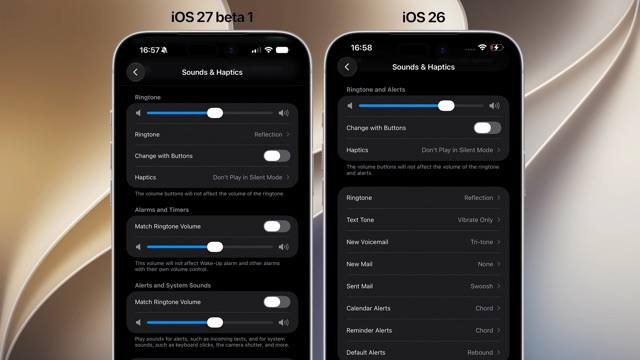
iOS Finally Introduces Independent Alarm Volume Control After 19 Years
In a long-awaited update that addresses one of the most persistent user experience limitations, Apple has finally implemented separate volume controls for alarms, ringtones, and notifications in iOS. This fundamental change comes nearly two decades after the original iPhone was introduced in 2007, marking a significant evolution in the operating system's audio management capabilities.
A Historic Change in iOS Audio Controls
For 19 years, iOS has operated with a single volume slider that controlled all system audio output uniformly. This approach, while simple in concept, created numerous frustrations for users who wanted to adjust alarm volume without affecting notification sounds or media playback.
The new implementation in the latest iOS release introduces a sophisticated audio control system with three distinct volume sliders:
- Ringtones and alerts - For incoming call sounds and other alerts
- Alarms and timers - Specifically for alarm clock sounds and timer alerts
- Notifications and system sounds - For app notifications, system chimes, and haptic feedback intensity
This granular control represents a significant shift in Apple's audio management philosophy, finally acknowledging that different audio elements serve distinct purposes and may require different volume levels depending on the context.
Technical Implementation and User Experience
The new volume controls are accessible through the Settings app under the "Sounds & Haptics" section. Here, users will find three separate sliders that can be adjusted independently, providing unprecedented control over their device's audio output.
| Audio Category | Previous Implementation | New Implementation |
|---|---|---|
| Ringtones | Controlled by master volume | Independent slider |
| Alarms | Controlled by master volume | Independent slider |
| Notifications | Controlled by master volume | Independent slider |
This change addresses a common scenario where users wanted to ensure their alarms would wake them up without being drowned out by media playback or notification sounds, or conversely, wanted to reduce notification volume while keeping alarm volume high.
Additional iOS Enhancements
Beyond the volume control overhaul, the latest iOS update introduces several other notable improvements to the user interface and functionality:
Expanded Widget Options
iOS now supports oversized widgets that provide more information at a glance. These larger widgets can be placed on the Home Screen and Lock Screen, offering users more detailed data without needing to open the corresponding app. This enhancement builds on the widget system introduced in iOS 14, further blurring the line between app interfaces and the home screen.
Flexible Clock Display
The Lock Screen clock now offers more customization options, including very small clock displays that allow users to maximize the space available for other elements like widgets and notifications. This flexibility acknowledges the diverse preferences of users and provides options for those who prioritize information density over prominent clock display.
macOS Improvements for iPhone Integration
Alongside the iOS updates, macOS version 27 (likely referring to macOS 14.x) introduces enhancements to iPhone Mirroring, a feature that allows users to control their iPhone from their Mac. The update provides a wider window for iPhone Mirroring, offering a more immersive and usable experience when accessing iPhone content from a Mac computer.
This improved integration represents Apple's continued commitment to creating a seamless ecosystem across its devices, allowing users to work and interact with their content regardless of which device they're using.
User Impact and Industry Significance
The introduction of independent volume controls addresses one of the most frequently requested iOS features, demonstrating Apple's responsiveness to user feedback. While seemingly a small change, it represents a significant quality-of-life improvement that will benefit millions of users worldwide.
This update also highlights Apple's ongoing refinement of its operating systems, balancing simplicity with increasingly sophisticated customization options. The ability to fine-tune different audio elements separately reflects a growing understanding that users need more granular control over their devices as they become more integrated into daily life.
Conclusion
The implementation of separate volume controls for alarms, ringtones, and notifications marks a significant milestone in iOS development. After 19 years of uniform volume management, users can finally tailor their device's audio output to their specific needs and preferences.
Combined with the expanded widget options, flexible clock display, and improved iPhone Mirroring in macOS, this update demonstrates Apple's commitment to enhancing user experience through thoughtful design and functionality improvements. As iOS continues to evolve, we can expect further refinements that address long-standing limitations while maintaining the simplicity and elegance that have defined the platform since its inception.
⏱️ It took 19 years to be able to adjust alarm volume separately from notifications iOS 🍎 finally lets you control alarm volume independently from other sounds. Until now, iOS used a single volume slider for everything. Now there are separate sliders: one for ringtones, one for alarms and timers, and one for notifications and system sounds. iOS 🍎 also brings oversized widgets and very small clock options on the lock screen, while macOS 27 gets a wider window for iPhone Mirroring. #iOS @DailyApple ⏱️ It took 19 years to be able to adjust alarm volume separately from notifications iOS 🍎 finally lets you control alarm volume independently from other sounds. Until now, iOS used a single volume slider for everything. Now there are separate sliders: one for ringtones, one for alarms and timers, and one for notifications and system sounds. iOS 🍎 also brings oversized widgets and very small clock options on the lock screen, while macOS 27 gets a wider window for iPhone Mirroring. #iOS @DailyApple


