 TechOffice
iOS 27 Unveils Seamless Bill Splitting via Apple Cash
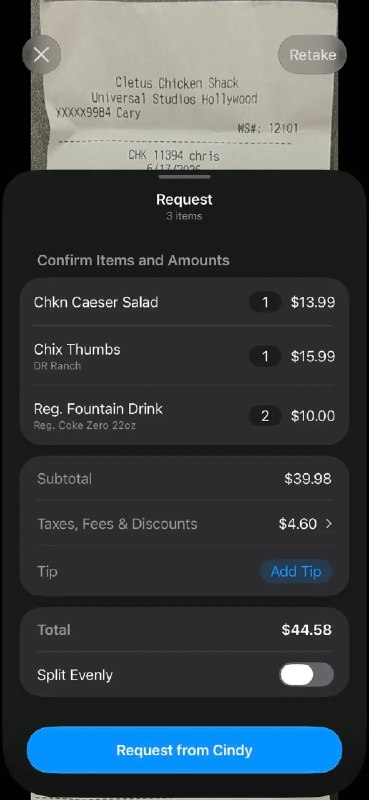
iOS 27 Revolutionizes Personal Finance with Integrated Bill Splitting via Apple Cash
In a significant move that further blurs the lines between social interactions and financial transactions, Apple has announced a groundbreaking bill splitting feature integrated directly into iOS 27. This new functionality leverages the existing Apple Cash infrastructure to allow seamless, secure, and convenient expense sharing among family members and friends.
Transforming How We Share Expenses
The bill splitting feature represents Apple's latest effort to consolidate financial services within its ecosystem. With this addition, users can easily split expenses for dinners, vacations, rent, or any shared costs directly through Messages or a dedicated Wallet interface, without the need for third-party applications or complex bank transfers.
Key Features and Functionality
The bill splitting functionality offers several impressive capabilities:
- Automatic Expense Recognition: iOS 27 can automatically detect shared expenses in Messages, suggesting split options when users mention amounts or expenses.
- Flexible Splitting Options: Users can split bills equally, by percentage, or assign specific amounts to individuals.
- Multi-Participant Support: The feature supports splitting bills among up to 20 participants simultaneously.
- Integration with Apple Cash: Funds are transferred directly between participants' Apple Cash balances.
- Expense History: All split transactions are automatically recorded in the Apple Wallet for easy tracking.
How to Use the Bill Splitting Feature
Using the bill splitting feature is designed to be intuitive:
- Open a conversation in Messages with the contacts you want to split a bill with.
- Type the amount and tap the "Split" suggestion that appears automatically.
- Choose your preferred splitting method (equal, by percentage, or custom).
- Add participants by selecting from the conversation or adding new contacts.
- Review the split details and confirm the transaction.
- Participants receive notifications and can approve their portion directly from their devices.
Security and Privacy Considerations
Apple has emphasized that the bill splitting feature maintains the company's commitment to privacy and security:
- All transactions are protected by Face ID, Touch ID, or device passcode.
- Financial information remains encrypted and is not shared with third parties.
- Users have granular control over who can request payments from them.
- Transaction histories are stored locally on devices unless explicitly backed up to iCloud.
Comparison with Existing Solutions
The table below compares Apple's new bill splitting feature with popular alternatives in the market:
| Feature | iOS 27 Bill Splitting | Venmo | PayPal | Splitwise |
|---|---|---|---|---|
| Platform Integration | Native iOS integration | Standalone app | Standalone app | Standalone app |
| Transaction Speed | Instant | Instant | 1-3 business days | N/A (tracking only) |
| Participants | Up to 20 | Unlimited | Unlimited | Unlimited |
| Transaction Fees | None (with Apple Cash) | None for standard transfers | 3% for instant transfers | Free |
| Social Features | Integrated with Messages | Social feed | Limited | Expense reminders |
Expert Analysis
Financial technology experts view this development as a significant step forward in digital payments:
"Apple's integration of bill splitting directly into iOS represents a major shift in how consumers will handle shared expenses," said Dr. Elena Rodriguez, a payments analyst at Global FinTech Insights. "By removing the friction of switching between apps and leveraging the existing Apple Cash infrastructure, Apple is creating a more cohesive financial ecosystem that could accelerate the adoption of P2P payments."
The feature also has implications for small businesses and service providers:
"For small businesses, this could simplify the process of collecting from groups or accepting deposits," noted James Peterson, founder of Small Business Tech Solutions. "Imagine a restaurant or event venue that can easily collect from large parties without the hassle of separate payments."
Limitations and Considerations
Despite its innovative approach, the bill splitting feature has some limitations:
- Apple Cash Requirement: All participants must have Apple Cash set up to use the feature.
- Geographic Availability: Initially limited to countries where Apple Cash is available.
- Device Compatibility: Requires iOS 27 and an iPhone compatible with Apple Pay.
- No Integration with Non-Apple Services:
- Business Account Limitations: Not designed for business-to-business expense splitting.
Future Implications
The introduction of bill splitting in iOS 27 signals Apple's broader strategy to expand its financial services:
"This is just the beginning," predicted tech analyst Sarah Kim. "We can expect Apple to continue building out its financial ecosystem, potentially introducing features like group savings, investment pooling, or even more sophisticated financial planning tools that leverage the iPhone's capabilities and user data in a privacy-preserving way."
Conclusion
The bill splitting feature in iOS 27 represents a significant evolution in personal finance management, demonstrating Apple's commitment to creating seamless, integrated experiences for its users. By combining the convenience of Messages with the security of Apple Cash, Apple has positioned itself to become a major player in the peer-to-peer payments market.
As digital payments continue to grow and social interactions increasingly intersect with financial transactions, features like this will become essential rather than optional. For Apple users, this integration promises to simplify one of life's common frustrations—splitting bills—while maintaining the company's signature focus on privacy, security, and user experience.
With iOS 27 expected to launch this fall, the bill splitting feature will likely be welcomed by millions of users seeking a more elegant solution to shared expenses, further cementing Apple's position at the intersection of technology and daily life.
New in iOS 27: you can now split bills with family and friends using Apple Cash 🔥 New in iOS 27: you can now split bills with family and friends using Apple Cash 🔥


