 TechOffice
Apple's iOS 27 Transforms Wallet App into Comprehensive Pass Management System
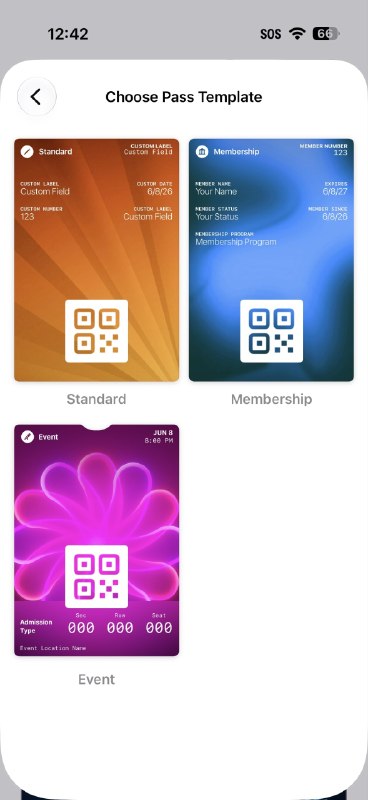
Apple Revolutionizes Digital Organization: iOS 27 Unveils Native Pass Creation in Wallet App
In a move that further solidifies its position at the forefront of digital innovation, Apple has introduced a groundbreaking feature in iOS 27 that allows users to create their own digital passes directly within the Wallet app. This significant enhancement transforms the Wallet from a passive repository for existing passes into an active creation platform, empowering users to generate custom tickets, membership cards, loyalty programs, and more with unprecedented ease.
Understanding the New Pass Creation Feature
The new pass creation functionality represents a fundamental evolution of Apple's digital wallet ecosystem. Previously, users were limited to adding passes that were generated by third-party organizations through their apps or websites. With iOS 27, Apple has democratized this process, enabling individuals and small businesses to create and manage their own digital passes without requiring specialized development knowledge or external tools.
This feature leverages Apple's existing pass technology, which has been refined over years of use in Apple Pay, boarding passes, event tickets, and loyalty cards. The implementation maintains the same high standards of security, visual design, and functionality that users have come to expect from Apple's ecosystem.
How the Pass Creation Process Works
Creating a new pass in iOS 27 is designed to be intuitive and accessible to all users. The process involves several straightforward steps:
- Open the Wallet app and tap the "+" button to add a new pass
- Select "Create New Pass" from the options menu
- Choose the pass type (ticket, membership, loyalty card, etc.)
- Customize the pass details including fields, images, colors, and information
- Configure any relevant notifications or automation features
- Save the pass to Wallet or share it with others
Apple has implemented a sophisticated yet user-friendly interface that guides users through each step while offering extensive customization options. The creation tools include templates for common pass types, as well as advanced options for those requiring more specific functionality.
Types of Passes Users Can Create
The new creation feature supports a wide variety of pass types, catering to numerous personal and professional use cases:
- Event Tickets: Concerts, sports games, conferences, and theater performances with optional seat selection and QR codes
- Membership Cards: Gym memberships, club memberships, and loyalty programs with tier systems and expiration dates
- Boarding Passes: Airline, train, and bus passes with real-time updates and gate information
- Student IDs: Digital identification for educational institutions with class schedules and library access
- Healthcare Cards: Insurance information, vaccination records, and appointment reminders
- Business Cards: Digital contact information with customizable fields and links
- Vouchers and Coupons: Promotional offers with redemption tracking and expiration dates
- Access Cards: Digital keys for hotels, offices, and residential buildings
Benefits for Users and Businesses
This new feature offers compelling advantages for both individual users and organizations:
For Individual Users
- Centralized Organization: All digital passes in one easily accessible location
- Reduced Physical Clutter: Elimination of physical cards and paper tickets
- Enhanced Convenience: Quick access to passes with iPhone or Apple Watch
- Real-time Updates: Automatic notifications for changes, updates, or reminders
- Personalization: Custom designs and information tailored to individual needs
For Small Businesses and Organizations
- Cost-Effective Solution: No need for expensive pass development services
- Direct Customer Engagement: Ability to create and distribute passes without intermediaries
- Brand Consistency: Customizable designs that maintain brand identity
- Data Analytics: Optional usage tracking and customer interaction insights
- Sustainability: Reduction in physical materials and waste
Technical Implementation and Design
Apple has implemented the pass creation feature with the same attention to detail and user experience that characterizes its products. The creation interface is clean, intuitive, and consistent with Apple's design language, while offering powerful functionality beneath the surface.
The passes themselves maintain Apple's signature visual quality, with high-resolution graphics, smooth animations, and clear typography. Users can choose from pre-designed templates or create custom passes from scratch, with options to add logos, choose color schemes, and organize information fields.
Technically, the passes leverage Apple's existing PKPass format, which uses cryptographic signatures to ensure authenticity and prevent tampering. This means that even self-created passes benefit from the same security framework that Apple has developed for its official passes.
Privacy and Security Considerations
As with all Apple features, privacy and security are central to the pass creation functionality. Apple has implemented several measures to protect user data:
- End-to-End Encryption: All pass data is encrypted both in transit and at rest
- Local Storage: Passes are stored locally on the device by default, with optional cloud backup
- User Control: Users have complete control over what information is included in their passes
- Minimal Data Collection: Apple collects minimal usage data, with opt-in analytics available for businesses
- Regular Security Audits: Continuous monitoring and updating of security protocols
Apple emphasizes that users retain ownership of their pass data and can delete or modify passes at any time. The company also provides clear guidance on best practices for pass creation to avoid security risks.
Comparison with Previous iOS Versions
The introduction of native pass creation in iOS 27 represents a significant advancement over previous versions. The following table highlights the key differences:
| Feature | iOS 26 and Earlier | iOS 27 |
|---|---|---|
| Pass Creation | Only third-party apps could create passes | Native creation directly in Wallet app |
| Customization | Limited to app-specific templates | Extensive customization options |
| Distribution | Required third-party app or email | Direct sharing via Messages, Mail, or AirDrop |
| Automation | Basic time-based reminders | |
| Integration | Limited to Apple Pay and specific apps |
Industry Impact and Market Implications
The introduction of native pass creation in iOS 27 is likely to have significant implications across multiple industries:
Event and Ticketing Industry
For event organizers and ticketing platforms, this feature could disrupt traditional models by enabling direct-to-consumer ticket creation without intermediaries. Small event organizers, in particular, benefit from a professional ticketing solution without the associated costs of dedicated platforms.
Loyalty and Membership Programs
Small and medium-sized businesses now have access to a sophisticated loyalty program system without needing to invest in custom software. This could level the playing field between large corporations with dedicated marketing teams and smaller local businesses.
Education Sector
Schools and universities can leverage this feature for student IDs, event tickets, and access control, potentially reducing administrative costs and improving security. The digital nature of these passes also enables easier updates and changes to student information.
Healthcare
While healthcare applications require additional regulatory compliance, the pass creation feature could streamline patient identification, appointment reminders, and vaccination records, particularly for smaller healthcare providers.
Future Possibilities and Integration
The introduction of pass creation in iOS 27 opens numerous possibilities for future development and integration:
- AR Integration: Potential for augmented reality features that overlay pass information on the real world
- Blockchain Verification: Future implementation of blockchain technology for enhanced security and verification
- Health Pass Expansion: Deeper integration with health records and vaccination status
- Smart Home Integration: Digital passes that serve as keys for smart homes and connected devices
- Automated Organization: AI-powered categorization and management of passes based on usage patterns
- Cross-Platform Compatibility: Potential expansion to Android and other platforms through industry standards
Conclusion: A New Era of Digital Organization
The introduction of native pass creation in iOS 27's Wallet app marks a significant milestone in Apple's digital ecosystem evolution. By empowering users to create their own digital passes, Apple has transformed the Wallet from a passive storage solution into an active organizational tool that can adapt to countless personal and professional needs.
This feature not only enhances convenience for individual users but also provides valuable opportunities for small businesses and organizations to engage with customers in new ways. As digital transformation continues to accelerate, Apple's focus on user-friendly, secure, and versatile digital tools positions it at the forefront of this shift.
Looking ahead, the pass creation feature is likely to continue evolving, with potential integration with emerging technologies like augmented reality, advanced AI, and blockchain verification. Regardless of future developments, this latest addition to iOS 27 demonstrates Apple's commitment to creating intuitive, powerful tools that enhance daily life while maintaining the highest standards of privacy and security.
You can now create a pass for tickets, memberships, and more in the Wallet app in iOS 27 🔥 You can now create a pass for tickets, memberships, and more in the Wallet app in iOS 27 🔥


