 TechOffice
After 19 Years, Apple Finally Allows Separate Alarm Volume Control
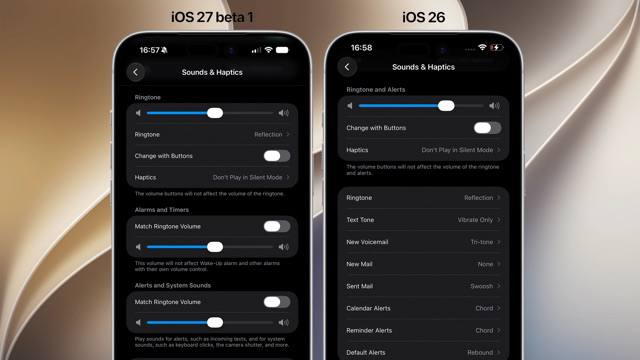
iOS Finally Introduces Independent Volume Controls After 19 Years
In a significant update that addresses long-standing user feedback, Apple has finally implemented separate volume controls for different audio categories in iOS. After 19 years of using a single volume slider for all system sounds, iOS users can now independently adjust the volume for ringtones, alarms and timers, as well as notifications and system sounds.
The Evolution of iOS Volume Management
Since its inception in 2007, iOS has utilized a simplified approach to volume control, with a single slider adjusting all system audio uniformly. This design philosophy aligned with Apple's commitment to simplicity but left users wanting more granular control over their audio experience.
Over the years, user feedback consistently highlighted the need for separate volume controls, particularly for alarms. The inability to adjust alarm volume independently has been a common point of frustration, especially for light sleepers who needed loud alarms but preferred quieter notification sounds.
| iOS Volume Control Timeline | |
|---|---|
| 2007-2023 | Single volume slider for all system sounds |
| 2023 | Introduction of Focus modes with selective sound control |
| 2024 | Implementation of separate volume controls for different audio categories |
New iOS Volume Control System
The updated volume control system introduces three distinct sliders, accessible through the Settings app or Control Center. This granular approach allows users to customize their audio experience based on specific needs and preferences.
Three Separate Volume Categories
- Ringtones: Controls the volume for incoming call alerts
- Alarms and Timers: Adjusts the volume for alarm sounds and timer alerts
- Notifications and System Sounds: Manages volume for app notifications, keyboard clicks, and other system audio
This separation addresses various use cases: a user might want loud alarms to wake up but prefer subtle notification sounds during work hours, or need louder ringtones in noisy environments while keeping system sounds at a minimum.
Additional iOS Updates
Beyond the volume control overhaul, iOS introduces several other notable enhancements that further customize the user experience.
Oversized Widgets
The latest iOS version expands widget customization options with oversized widgets that provide more information at a glance. These larger widgets display more content without requiring users to tap into the app, offering a more efficient information consumption experience.
Compact Clock Options
For users who prefer a minimalist lock screen, iOS now offers very small clock options. This customization allows users to maximize lock screen real estate for widgets and photos while still maintaining essential time display.
macOS Enhancements
Complementing the iOS updates, macOS introduces improvements to iPhone Mirroring, a feature that allows users to access their iPhone content on their Mac. The update provides a wider window for iPhone Mirroring, offering a more immersive and usable experience when switching between devices.
| Key Features of Updated iPhone Mirroring | |
|---|---|
| Wider Display Window | Increased screen real estate for iPhone content on Mac |
| Improved Responsiveness | Enhanced performance when interacting with iPhone apps |
| Better Integration | Seamless switching between Mac and iPhone interfaces |
User Experience and Accessibility Improvements
These updates collectively enhance user experience by providing greater customization options and addressing long-standing limitations. For users with hearing sensitivities, the ability to adjust alarm volume independently from other sounds is particularly valuable.
The expanded widget options and compact clock display also contribute to accessibility by allowing users to tailor their device interface to their specific visual and functional needs.
Industry Impact and Future Predictions
This shift toward more granular control in iOS reflects Apple's evolving approach to user customization while maintaining its design philosophy. The implementation comes as competitors have offered similar controls for years, suggesting Apple is responding to persistent user demand.
Industry analysts predict that future iOS updates may continue this trend of increased customization, potentially introducing separate volume controls for media playback, voice calls, and other audio categories.
Conclusion
The introduction of independent volume controls in iOS marks a significant milestone in the platform's evolution, addressing a fundamental limitation that persisted for 19 years. Combined with the expanded widget options and compact clock display, these updates demonstrate Apple's commitment to refining the user experience based on feedback and changing needs.
For users who have long awaited the ability to customize their device's audio experience more precisely, these changes represent not just new features, but a recognition of their preferences and requirements. As Apple continues to balance simplicity with functionality, such updates signal a promising direction for future iOS development.
⏱️ It took 19 years to be able to adjust alarm volume separately from notifications iOS 🍎 finally lets you control alarm volume independently from other sounds. Until now, iOS used a single volume slider for everything. Now there are separate sliders: one for ringtones, one for alarms and timers, and one for notifications and system sounds. iOS 🍎 also brings oversized widgets and very small clock options on the lock screen, while macOS 27 gets a wider window for iPhone Mirroring. #iOS @DailyApple ⏱️ It took 19 years to be able to adjust alarm volume separately from notifications iOS 🍎 finally lets you control alarm volume independently from other sounds. Until now, iOS used a single volume slider for everything. Now there are separate sliders: one for ringtones, one for alarms and timers, and one for notifications and system sounds. iOS 🍎 also brings oversized widgets and very small clock options on the lock screen, while macOS 27 gets a wider window for iPhone Mirroring. #iOS @DailyApple


