 TechOffice
Anticipating the Revolution: Samsung's Galaxy S25 Series Set to Transform Mobile Technology
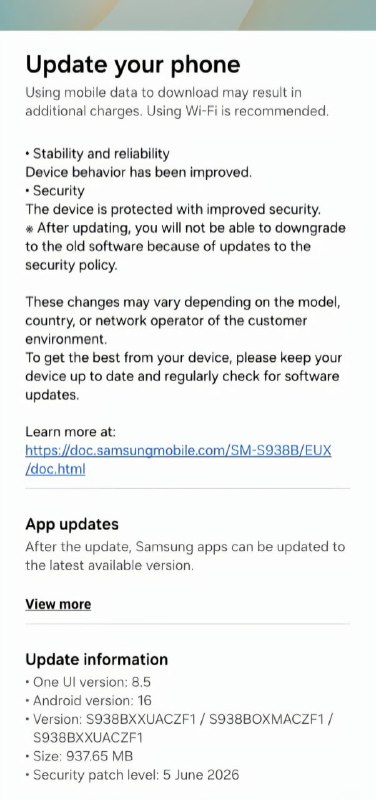
Samsung Rolls Out One UI 8.5 June Update for Galaxy S25 Series with Enhanced Notification Management and File Summaries
Samsung has commenced the rollout of the One UI 8.5 June update for its latest Galaxy S25 series in European markets, bringing with it build version S938BXXUACZF1. This latest update introduces significant enhancements to notification management and file organization, further refining the user experience on Samsung's flagship devices.
Introduction to One UI 8.5 June Update
The One UI 8.5 June update represents Samsung's commitment to continuous improvement of its software experience for the Galaxy S25 series. As part of Samsung's regular update cycle, this release focuses on enhancing productivity and streamlining daily interactions with the device. The update is now available for users in Europe, with other regions expected to follow in the coming days.
One UI, Samsung's custom Android interface, has consistently been praised for its intuitive design and feature-rich experience. The Galaxy S25 series, being the latest flagship offering, benefits from Samsung's most advanced software optimizations and AI-driven features.
Key Features in the June Update
The latest One UI 8.5 update introduces two major features designed to enhance user productivity and device management:
- Prioritize and Summarize Notifications: A sophisticated notification management system that intelligently categorizes and summarizes incoming notifications
- Show File Summaries: An AI-powered feature that provides quick previews and summaries of various file types directly from the file manager
Prioritize and Summarize Notifications
The enhanced notification management system represents a significant leap forward in how users interact with their device's notifications. The new feature employs advanced AI algorithms to automatically categorize incoming notifications based on importance, sender, and content type.
Notifications are now intelligently grouped into categories such as communications, social media, work, and personal alerts. Each category receives a visual indicator of priority, allowing users to quickly identify which notifications require immediate attention.
For particularly active notification streams, the system generates concise summaries, condensing multiple related notifications into a single, digestible entry. This is particularly useful for busy professionals who receive numerous emails throughout the day or for social media users with high activity.
Users can customize notification priority levels through an updated notification center, setting preferences for different apps and contact types. The system learns from user behavior over time, continually improving its ability to present the most relevant notifications at the top of the notification list.
Show File Summaries
The new file summaries feature brings powerful AI capabilities to the Galaxy S25's file management system. When browsing through the device's file manager, users can now view concise summaries of various file types without needing to open them individually.
This feature supports a wide range of file formats, including:
- Documents (PDF, DOC, DOCX)
- Spreadsheets (XLS, XLSX)
- Presentations (PPT, PPTX)
- Text files (TXT, RTF)
- Email files (EML, MSG)
The AI-powered system extracts key information from each file, providing a brief overview of its content. For documents, this might include the main topics discussed, key statistics, or important dates. For emails, it might show the sender, subject, and a brief snippet of the content.
This feature is particularly valuable for users who frequently need to review multiple files quickly or who have limited time to sift through large volumes of documents. The summaries are generated locally on the device, ensuring privacy and fast access.
Additional Improvements in the Update
Beyond the headline features, the One UI 8.5 June update includes several other improvements that enhance the overall user experience:
- Performance optimizations to improve app launch times and system responsiveness
- Enhanced battery management algorithms to extend usage time
- Security patches addressing vulnerabilities discovered since the last update
- UI refinements to improve consistency across system applications
- Improved stability for the camera application, particularly in low-light conditions
Update Rollout Process
Samsung typically employs a phased rollout strategy for its software updates, starting with a limited release to monitor for any potential issues before wider distribution. The One UI 8.5 June update is currently available for Galaxy S25 series devices in European markets, with other regions expected to receive the update in the coming days.
To check for the update, users can navigate to Settings > Software update > Download and install. The update size varies depending on the previous software version on the device but generally ranges between 800MB to 1.2GB.
For users who prefer to manually download and install the update, Samsung also provides firmware files through its Odin tool for advanced users, though this method is recommended only for those comfortable with the process.
Future Updates for Galaxy S25 Series
The Galaxy S25 series is expected to receive regular updates throughout its lifecycle, with Samsung typically providing four major Android updates and five years of security patches for its flagship devices. Users can anticipate additional One UI refinements and new AI-powered features in future updates.
Industry analysts suggest that Samsung may continue to focus on AI-driven features in upcoming releases, potentially expanding the notification management and file summarization capabilities with more sophisticated natural language processing and contextual awareness.
Comparison: New Features in One UI 8.5 June Update
| Feature | Description | Benefit |
|---|---|---|
| Prioritize and Summarize Notifications | AI-powered categorization and summarization of notifications | Reduces notification overload, highlights important alerts |
| Show File Summaries | Quick previews and summaries of various file types | Speeds up file browsing, improves productivity |
| Performance Optimizations | Improved system responsiveness and app launch times | Enhanced overall user experience |
| Security Enhancements | Latest security patches and vulnerability fixes | Improved device protection |
Conclusion
The One UI 8.5 June update for the Galaxy S25 series represents Samsung's ongoing commitment to enhancing user experience through intelligent software features. The introduction of advanced notification management and file summarization capabilities demonstrates Samsung's focus on leveraging AI to solve real-world user problems.
For Galaxy S25 users in Europe, this update brings tangible improvements to daily device interaction, particularly for those who manage high volumes of notifications and files. As Samsung continues to roll out this update to other regions, more users will benefit from these productivity-enhancing features.
The update reinforces Samsung's position as a leader in smartphone software innovation, particularly in the integration of AI features that enhance rather than complicate the user experience. As the smartphone market increasingly differentiates through software rather than hardware, features like these will likely become key differentiators for Samsung's flagship devices.
Galaxy S25 Series Samsung has released the One UI 8.5 June update for the Galaxy S25 Series in Europe with build version S938BXXUACZF1. What's new: - Prioritize and Summarize Notifications - Show File Summaries via: tarunvats ❤️ @OneUIForGalaxy Galaxy S25 Series Samsung has released the One UI 8.5 June update for the Galaxy S25 Series in Europe with build version S938BXXUACZF1. What's new: - Prioritize and Summarize Notifications - Show File Summaries via: tarunvats ❤️ @OneUIForGalaxy


