 TechOffice
Galaxy S26 Ultra: One UI 9.0 Good Lock Updates Deliver Enhanced Customization Power
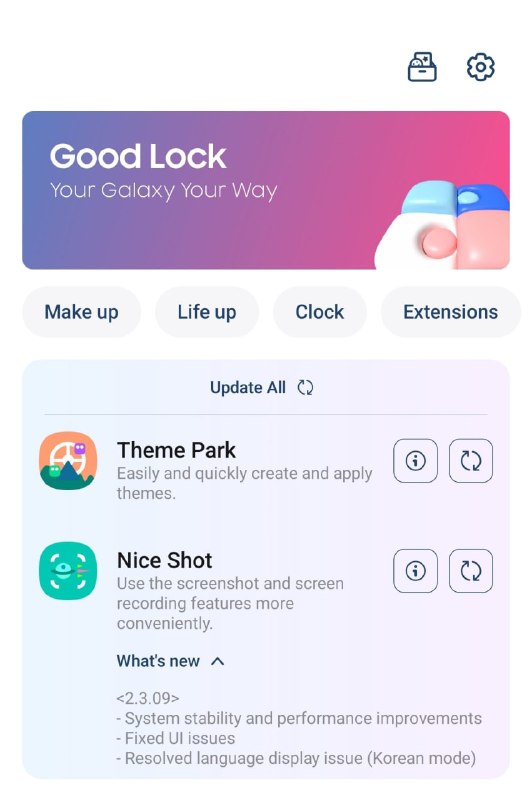
Galaxy S26 Ultra Receives Significant Good Lock Updates for One UI 9.0
In a move to enhance user experience and refine its flagship device's software capabilities, Samsung has rolled out substantial updates for the Good Lock suite on the Galaxy S26 Ultra. Released on June 11, 2026, these updates target two key modules: Theme Park and Nice Shot, bringing improvements in customization, stability, and overall performance.
Understanding Good Lock's Role in One UI 9.0
Good Lock represents Samsung's commitment to providing users with unprecedented customization options for their devices. This modular system allows users to modify various aspects of the interface without compromising system stability or voiding warranties. As One UI 9.0 continues Samsung's design philosophy of putting user experience first, Good Lock modules become increasingly important in differentiating Samsung's offering from competitors.
The Galaxy S26 Ultra, Samsung's premium flagship for 2026, benefits particularly from these updates as users seek to personalize their high-end devices while maintaining the polished, intuitive experience that One UI is known for.
Theme Park Update: Version 1.1.02.01
The Theme Park module update brings significant enhancements to the visual customization capabilities of the Galaxy S26 Ultra. This module, which allows users to create and apply custom themes across the system, has been refined to better align with One UI 9.0's design language and capabilities.
| Feature | Improvement |
|---|---|
| Keyboard Customization | New keycap designs compatible with One UI 9 |
| Application Integration | Enhanced live icons and previews for Clock and Calendar |
| Visual Quality | Refined color tuning and overall theme quality |
| General Experience | Usability enhancements and bug fixes |
These updates address several user requests for more sophisticated keyboard customization options. The new keycap designs provide users with additional ways to personalize their typing experience, moving beyond the standard keyboard themes previously available. This is particularly significant for power users who spend considerable time typing on their devices.
The improved live icons and previews for Clock and Calendar applications demonstrate Samsung's attention to detail in ensuring that custom themes work seamlessly across first-party applications. This integration is crucial for maintaining a cohesive visual experience throughout the system.
Nice Shot Update: Version 2.3.09
The Nice Shot module, which enhances the camera experience on Samsung devices, receives important updates focused on stability and performance. This module provides additional controls and features that complement the Galaxy S26 Ultra's sophisticated camera hardware.
| Issue Addressed | Solution Provided |
|---|---|
| System Stability | General improvements to performance and stability |
| User Interface | Resolved interface issues for smoother interaction |
| Language Display | Corrected Korean mode display discrepancies |
These updates are particularly important given the Galaxy S26 Ultra's advanced camera system, which includes multiple lenses and sophisticated computational photography features. The Nice Shot module extends these capabilities with additional controls and effects, making stability and performance critical for a positive user experience.
The correction of language display issues in Korean mode demonstrates Samsung's commitment to addressing specific regional concerns and ensuring that all users, regardless of language preference, have a consistent experience with the module.
Impact on Galaxy S26 Ultra Users
These updates represent Samsung's ongoing effort to refine and enhance the user experience on its flagship devices. For Galaxy S26 Ultra owners, the improvements in Theme Park offer more comprehensive customization options, allowing for greater personalization of the device's appearance and feel. The Nice Shot updates ensure that the camera experience remains smooth and reliable, even when using advanced features.
One UI 9.0 continues to build upon Samsung's design philosophy, which emphasizes intuitive interaction and thoughtful organization of features. The Good Lock updates complement this philosophy by providing users with tools to further customize their experience without compromising the underlying system's stability or security.
Future of Samsung's Customization Strategy
As Samsung continues to develop its software ecosystem, the importance of modular customization like Good Lock becomes increasingly apparent. The company's ability to deliver targeted updates to specific modules allows for more agile development and quicker response to user feedback.
The Galaxy S26 Ultra, with its cutting-edge hardware and refined software experience, exemplifies Samsung's commitment to providing a premium device that balances power with personalization. As we move further into 2026, users can expect additional refinements to the Good Lock suite and other aspects of One UI, further enhancing the Samsung experience.
For Galaxy S26 Ultra owners, these updates are available now and can be installed through the Galaxy Store or Samsung Members app. As with all software updates, users are encouraged to back up important data before installation to ensure a smooth transition.
Galaxy S26 Ultra: One UI 9.0 Good Lock Updates – June 11, 2026 Theme Park – Version 1.1.02.01 - Enhanced keyboard customization featuring new keycap designs compatible with One UI 9. - Improved live icons and previews for the Clock and Calendar applications (One UI 9). - Refined color tuning and overall theme quality. - General usability enhancements and bug fixes. Nice Shot – Version 2.3.09 - Improvements to system stability and performance. - Resolved user interface issues. - Corrected language display discrepancies in Korean mode. ❤️ @OneUIForGalaxy Galaxy S26 Ultra: One UI 9.0 Good Lock Updates – June 11, 2026 Theme Park – Version 1.1.02.01 - Enhanced keyboard customization featuring new keycap designs compatible with One UI 9. - Improved live icons and previews for the Clock and Calendar applications (One UI 9). - Refined color tuning and overall theme quality. - General usability enhancements and bug fixes. Nice Shot – Version 2.3.09 - Improvements to system stability and performance. - Resolved user interface issues. - Corrected language display discrepancies in Korean mode. ❤️ @OneUIForGalaxy


