 TechOffice
Quick Star Unveils Significant Upgrade in Latest Version 11.0.3.15
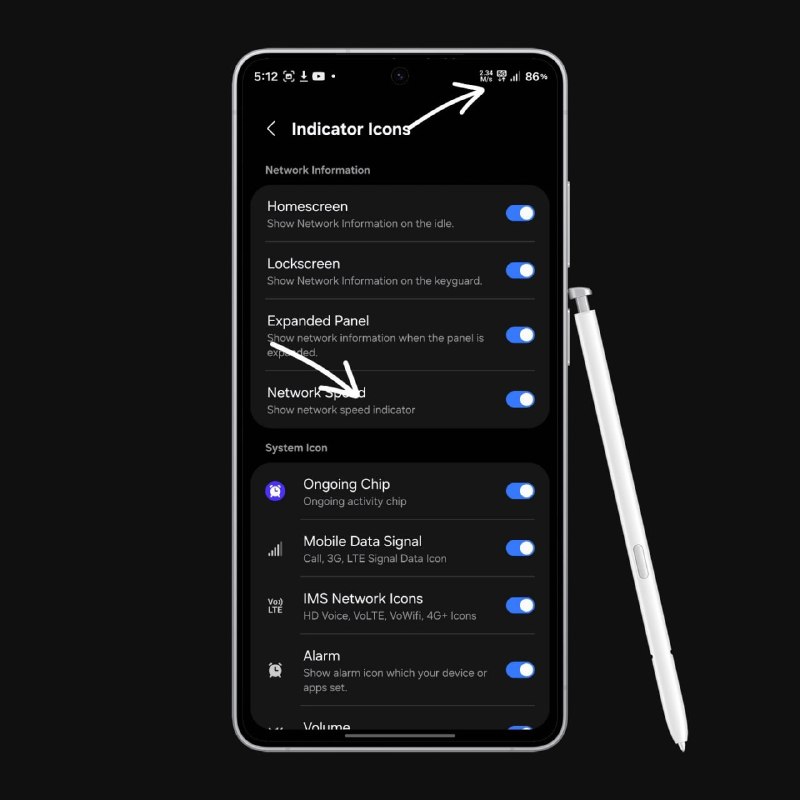
Samsung Finally Implements Long-Requested Network Speed Indicator in One UI Update
In a move that has delighted Galaxy smartphone users worldwide, Samsung has officially incorporated one of the most highly requested features in One UI's history: the Network Speed Indicator. This functionality, now available in the latest Quick Star update (v11.0.3.15), addresses years of user feedback and provides real-time network speed information directly on the device's status bar.
The Evolution of Network Monitoring on Samsung Devices
For several years, Samsung Galaxy users have expressed their desire for a native network speed indicator similar to what's available on other Android skins and third-party applications. Previously, users had to rely on third-party applications or developer options to monitor their network speeds, which often provided inconsistent or inconvenient experiences.
The implementation of this feature represents Samsung's ongoing commitment to refining the One UI experience based on direct user feedback. The Network Speed Indicator joins a growing list of features that Samsung has implemented in response to community requests.
Understanding the Network Speed Indicator Feature
The Network Speed Indicator provides users with real-time information about their current network connection speed directly in the status bar. This allows users to:
- Monitor network performance at a glance
- Identify when switching between Wi-Fi and cellular networks
- Detect potential network issues quickly
- Compare network speeds across different locations
The feature displays download and upload speeds in the status bar, updating in real-time as network conditions change. This information is particularly valuable for users who frequently work with large files, stream high-definition content, or rely on stable connections for online gaming or video conferencing.
Implementation Details and Compatibility
The Network Speed Indicator is now available through the Quick Star update v11.0.3.15, which serves as a testing ground for new One UI features before their broader rollout. Quick Star, Samsung's experimental firmware program, allows the company to gather feedback on new features from a dedicated user base before implementing them in official updates.
Based on previous Samsung feature implementations, the Network Speed Indicator is expected to be compatible with a wide range of Galaxy devices, including:
| Device Category | Expected Compatibility | Notes |
|---|---|---|
| Flagship Models (S Series, Z Series) | Full Support | Latest models will receive the feature first |
| Mid-Range (A Series, M Series) | Partial Support | May be limited to newer models |
| Entry-Level Devices | Limited/No Support | Depends on hardware capabilities |
Technical Specifications
The Network Speed Indicator operates by continuously monitoring network traffic and calculating speeds based on data transfer rates. The feature appears to sample network activity at regular intervals (approximately every 500ms) to provide smooth, real-time updates without significantly impacting device performance or battery life.
Users can customize the indicator through the settings menu, with options to:
- Toggle the feature on/off
- Choose between automatic and manual update intervals
- Select display format (Mbps, MB/s, etc.)
- Adjust position and appearance
User Reactions and Community Response
The announcement has been met with widespread enthusiasm in the Samsung community. The feature has been requested for years in Samsung's community forums, social media platforms, and feedback channels, making its implementation a significant victory for user-driven development.
Early testers have reported positive experiences with the Network Speed Indicator, particularly praising its:
- Minimal battery impact
- Accurate speed readings
- Seamless integration with existing One UI design
- Useful real-time information
Some users have suggested potential improvements, such as historical data tracking, network quality indicators, and the ability to set speed thresholds for notifications.
Historical Context: The Journey to Implementation
The request for a native network speed indicator on Samsung devices dates back to the early days of One UI. Samsung's community forums have featured numerous threads discussing the need for such a feature, with users often citing third-party applications like Network Cell Info Lite or Speedtest as examples of what they hoped to see natively implemented.
| Timeline | Milestone | Significance |
|---|---|---|
| 2019-2020 | Initial user requests | Community begins requesting feature |
| 2021 | Third-party solutions gain popularity | Demonstrates market demand for feature |
| 2022 | Samsung acknowledges interest | Company begins considering implementation |
| 2023 | Feature appears in Quick Star | Testing phase begins |
Future Implications and Potential Expansions
The implementation of the Network Speed Indicator may signal Samsung's renewed focus on enhancing connectivity features in One UI. Potential future expansions could include:
- Network quality metrics beyond speed (latency, packet loss)
- Historical network performance tracking
- Integration with Samsung's SmartThings ecosystem
- AI-powered network optimization suggestions
This feature also demonstrates Samsung's continued investment in the Quick Star program as a platform for testing and refining new features. The program allows Samsung to gather real-world feedback from a dedicated user base before broader implementation, potentially reducing bugs and improving user satisfaction.
Conclusion: A Win for User-Driven Development
The introduction of the Network Speed Indicator represents more than just a new feature—it demonstrates Samsung's responsiveness to user feedback and commitment to improving the One UI experience. After years of requests, Galaxy users can now monitor their network speeds directly from the status bar, eliminating the need for third-party applications and providing a more integrated experience.
As Samsung continues to develop One UI, features like the Network Speed Indicator highlight the company's ability to listen to its user base and implement solutions that address real needs. The feature's availability through the Quick Star update v11.0.3.15 marks an important step in its journey to becoming a standard part of the One UI experience across Samsung's device ecosystem.
For Galaxy users eager to try the new feature, the Quick Star update provides an opportunity to experience it ahead of its official rollout. As with any experimental firmware, users should proceed with caution and ensure they understand the implications of installing test software on their devices.
The Network Speed Indicator joins a growing list of user-requested features that Samsung has implemented in recent years, including improved dark mode, better one-handed operation support, and enhanced privacy controls. This pattern suggests that Samsung's development process continues to prioritize user feedback, potentially setting a standard for other manufacturers to follow.
Quick Star has received a new update (v11.0.3.15). Furthermore, Samsung has finally incorporated one of the most requested One UI features: the Network Speed Indicator. Galaxy users have requested this feature for several years. APK: http://gofile.io/d/1x03uS ❤️ @OneUIForGalaxy Quick Star has received a new update (v11.0.3.15). Furthermore, Samsung has finally incorporated one of the most requested One UI features: the Network Speed Indicator. Galaxy users have requested this feature for several years. APK: http://gofile.io/d/1x03uS ❤️ @OneUIForGalaxy


