 TechOffice
Samsung Pushes Enhanced Always On Display Update to Select Galaxy Devices
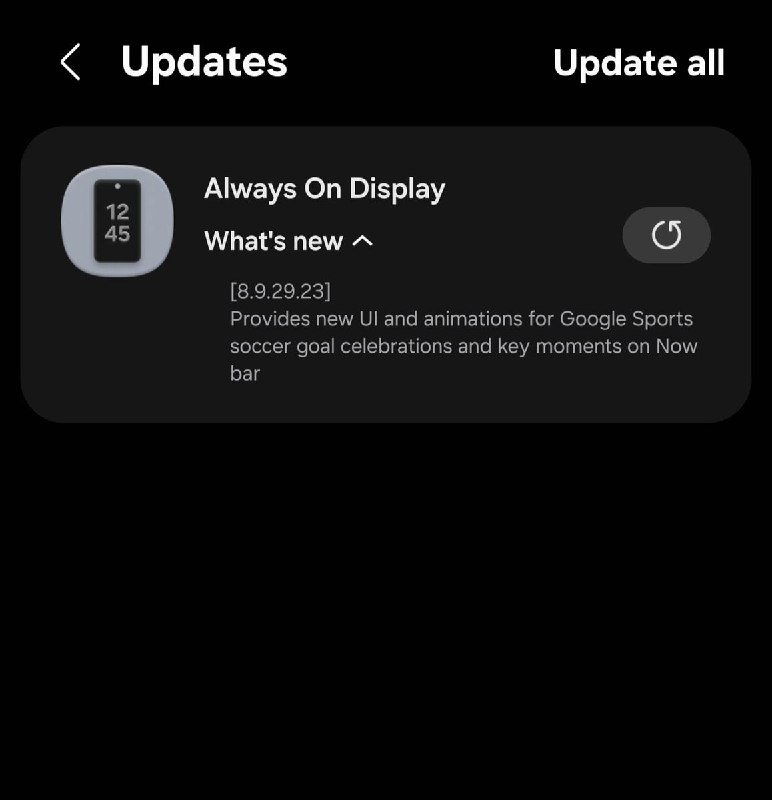
Samsung Rolls Out Enhanced Always On Display with Google Sports Integration
Samsung has released a significant update to its Always On Display (AOD) functionality, bringing version 8.9.29.23 to select Galaxy devices through the Galaxy Store. This latest iteration introduces exciting new features centered around sports content, particularly soccer, enhancing the user experience with dynamic visual elements and real-time information display.
Overview of the Update
The new Always On Display update represents Samsung's continued commitment to enhancing its software experience beyond the traditional lock screen functionality. Version 8.9.29.23 introduces several sports-centric features that transform the AOD into a more interactive and information-rich display, particularly for sports enthusiasts.
While the update is currently rolling out to "some devices," Samsung typically makes such updates available across its recent flagship and mid-range lineup over time. Users are encouraged to check their Galaxy Store regularly for availability.
Key Features in This Update
The latest AOD enhancement focuses on integrating sports content directly into the always-visible display, allowing users to stay connected to their favorite teams and matches without unlocking their devices.
| Feature | Description |
|---|---|
| New UI and Animations for Google Sports | Redesigned interface with enhanced visual elements for Google Sports content |
| Soccer Goal Celebrations | Animated celebrations triggered when goals are scored in soccer matches |
| Key Match Moments Support | Important game events displayed directly in the Now Bar section |
Detailed Feature Breakdown
Enhanced Google Sports Integration
The most significant addition in this update is the completely redesigned user interface for Google Sports content within the Always On Display. Samsung has collaborated with Google to create a more visually appealing and informative sports experience that appears when the device is in its standby state.
The new UI features improved typography, better use of color to distinguish between different sports and teams, and smoother animations that make the content more engaging. This enhancement transforms the AOD from a simple clock and notification display into a mini sports dashboard.
Soccer Goal Celebrations
Sports fans will particularly appreciate the animated goal celebrations that appear when a goal is scored in soccer matches tracked through Google Sports. Instead of just receiving a text notification, users will now see dynamic animations that reflect the excitement of a goal being scored.
These celebrations are designed to be:
- Visually distinct for different teams
- Responsive to the intensity of the match
- Customizable in terms of intensity and duration
The animations appear directly on the AOD, creating an immersive experience that keeps users engaged with the game even when they're not actively watching it.
Key Match Moments in the Now Bar
The update also enhances the Now Bar functionality by integrating key match moments. The Now Bar, a prominent feature of Samsung's AOD, now displays critical game events such as:
- Goals scored
- Yellow and red cards
- Substitutions
- Halftime and full-time notifications
- Important statistics updates
This integration ensures that users can quickly glance at their device and stay informed about the most significant moments in their followed matches, all without unlocking their phones or opening dedicated sports apps.
Technical Improvements and User Experience
Beyond the visible features, version 8.9.29.23 of the Always On Display likely includes several technical improvements that enhance overall performance and battery efficiency. Samsung has consistently worked to balance the visual appeal of AOD with its impact on battery life.
The sports-specific features are designed to be:
- Optimized for minimal battery consumption
- Configurable to allow users to control which sports and teams they follow
- Adaptive to different screen sizes and resolutions
Compatibility and Availability
While the source information doesn't specify which exact devices will receive this update, Samsung typically makes such enhancements available across its recent Galaxy smartphone and tablet lineup. The update is being distributed through the Galaxy Store, Samsung's dedicated application store for device-specific software and content.
To check if the update is available for your device:
- Open the Galaxy Store app on your Samsung device
- Navigate to the "Updates" section
- Look for "Always On Display" in the list of available updates
- If available, tap "Download" and then "Install" to apply the update
The Evolution of Always On Display
This update continues Samsung's evolution of the Always On Display functionality, which has grown from a simple clock display to a sophisticated information hub. Since its introduction, AOD has incorporated:
- Customizable clock styles and themes
- Notification previews
- Music player controls
- Calendar appointments
- Weather information
- And now, sports content integration
The addition of sports content represents Samsung's strategy to make the AOD more personalized and useful for users' specific interests and lifestyles.
Future Implications
The integration of sports content into the Always On Display suggests that Samsung may expand this approach to other categories of content in future updates. Potential areas for expansion could include:
- Stock market updates for financial users
- Smart home control interfaces
- Health and fitness tracking
- Entertainment content integration
This approach aligns with Samsung's broader strategy of making its devices more central to users' daily lives by providing at-a-glance access to the information and content that matters most to them.
Conclusion
The Always On Display update v8.9.29.23 represents a thoughtful enhancement that adds significant value for sports fans while maintaining the core functionality that users have come to expect. By integrating Google Sports content with dynamic animations and real-time match updates, Samsung has transformed the AOD into a more engaging and information-rich interface.
As Samsung continues to refine its software experience, features like this demonstrate the company's understanding that modern smartphone users desire quick access to personalized content without compromising battery life or device performance. For sports enthusiasts, this update makes their Galaxy devices even more valuable companions for following their favorite teams and matches.
Users are encouraged to check the Galaxy Store regularly for this update and to provide feedback to Samsung through the Samsung Members app or other feedback channels to help shape future enhancements to the Always On Display functionality.
A new Always On Display update (v8.9.29.23) is now available in the Galaxy Store for some devices What's New 👇 ⚽️ New UI and animations for Google Sports 🥅 Soccer goal celebrations 📊 Key match moments support in the Now Bar Check your Galaxy Store via: tarunvats ❤️ @OneUIForGalaxy A new Always On Display update (v8.9.29.23) is now available in the Galaxy Store for some devices What's New 👇 ⚽️ New UI and animations for Google Sports 🥅 Soccer goal celebrations 📊 Key match moments support in the Now Bar Check your Galaxy Store via: tarunvats ❤️ @OneUIForGalaxy


