 TechOffice
Google Introduces Innovative "Auto-Space After Suggestions" Feature in Gboard Testing Phase
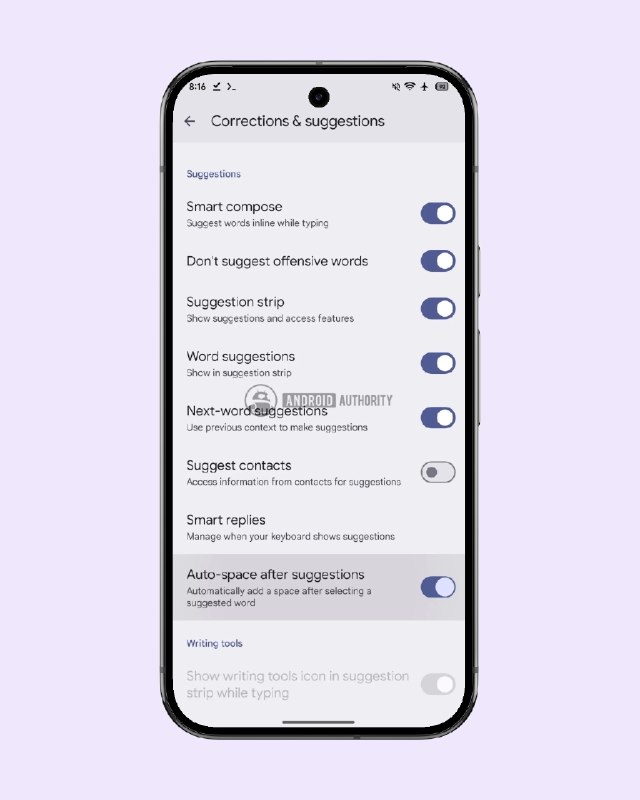
Google Innovates Gboard with New Auto-space Setting
In a move aimed at enhancing user experience, Google is currently testing a new feature for its widely used keyboard application, Gboard. This feature, known as Auto-space after suggestions, empowers users with the option to disable the automatic insertion of spaces following the selection of predictive words. The change is poised to provide greater flexibility and control to users regarding their typing preferences.
Understanding the New Auto-space Feature
The Auto-space after suggestions setting addresses a common concern among Gboard users who may prefer a more tailored typing experience. Typically, Gboard inserts a space automatically after a user selects a suggested word. While this can streamline typing, it may not align with all users’ writing styles or preferences. By introducing this toggle, Google aims to accommodate a broader range of user needs, allowing for a more customized keyboard interaction.
Key Features of the Auto-space Setting
- Increased Flexibility: Users will have the option to enable or disable automatic spacing.
- Enhanced Control: Tailoring the typing experience to fit individual writing habits.
- Potential for Increased Productivity: By adjusting typing settings, users may experience smoother workflows.
Implications for Users
This proposed setting has the potential to impact various user groups. For instance, those who often switch between different languages or specialized writing styles may find the ability to disable auto spacing particularly beneficial. Additionally, users who frequently compose messages in quick succession may appreciate the control afforded by this new feature, minimizing the need for constant corrections and improving overall typing efficiency.
Technical Insights from Gboard’s Development
The discovery of this new feature came from a teardown of the latest Gboard APK, with insights provided by developers and a notable leak from the tech community under the handle @GappsLeaks. Such APK teardown analyses often reveal hidden features and potential enhancements before they are rolled out to the public, thus providing insights into the direction of app development.
Conclusion
The introduction of the Auto-space after suggestions option in Gboard reflects Google’s commitment to refining user experience through adaptable technology. By allowing users to modify how they interact with predictive text, Google acknowledges and caters to the diverse needs of its user base. As this feature continues to be tested, it offers a glimpse into the future of more customizable digital communication tools.
| Feature | Description |
|---|---|
| Auto-space After Suggestions | Option to disable automatic space after selecting a suggested word |
| Flexibility | Allows users to customize their typing experience |
| Control | Empowers users with more control over text input |
| Productivity | Aims to improve writing efficiency for diverse users |
As Google continues its testing phase for this feature, it is anticipated that it will enrich the overall functionality of Gboard and enhance user satisfaction in the long run.
Google is testing a new Gboard setting called "Auto-space after suggestions" that allows users to disable the automatic insertion of spaces after selecting a predicted word ✅ Details - https://www.androidauthority.com/gboard-spaces-after-autocorrect-suggestions-apk-teardown-3689011/ @GappsLeaks Google is testing a new Gboard setting called "Auto-space after suggestions" that allows users to disable the automatic insertion of spaces after selecting a predicted word ✅ Details - https://www.androidauthority.com/gboard-spaces-after-autocorrect-suggestions-apk-teardown-3689011/ @GappsLeaks


