 TechOffice
Persistent Technical Bug Remains Unresolved After Five Years
Microsoft To Do's Persistent Display Bug: A Five-Year User Experience Nightmare
In an era where productivity tools are expected to seamlessly integrate into daily workflows, Microsoft To Do presents a remarkable case of long-standing user interface failure. Despite being a core component of Microsoft's productivity suite, the application has reportedly failed to correctly display user information for an astonishing five years, creating significant workflow inefficiencies and user frustration.
The Core Issue: Display Failures
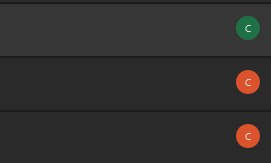
The problem centers on how Microsoft To Do renders user information. According to user reports, when a naming convention as standard as "Company XYZ | Firstname Lastname" is used—common in corporate environments—the application consistently displays only the letter "C" for all users. This results in a visually confusing interface where every task assignee appears as a generic blue circle containing the single letter "C".
What makes this issue particularly problematic is that profile photos are also failing to display, despite being present for 60% of users (3 out of 5) who require the application for their daily tasks. The same users display correctly with full names and profile photos in other Microsoft applications like Teams and Outlook, highlighting a specific To Do rendering problem.
Impact on Productivity
This display failure creates tangible productivity obstacles:
- Users must perform additional clicks to identify task assignees
- Task assignment becomes a guessing game in some cases
- Visual workflow organization is compromised
- User cognitive load increases due to unnecessary identification steps
The issue transforms what should be a simple visual confirmation of task ownership into a time-consuming verification process, directly contradicting the application's purpose of enhancing productivity.
Comparison with Other Microsoft Products
The following table illustrates the inconsistent display of user information across Microsoft's productivity suite:
| Application | User Name Display | Profile Photo Display | Status |
|---|---|---|---|
| Microsoft To Do | Shows only "C" | Does not show | BROKEN |
| Microsoft Teams | Shows full name | Shows correctly | Working |
| Outlook | Shows full name | Shows correctly | Working |
| SharePoint | Shows full name | Shows correctly | Working |
The Five-Year Persistence
Perhaps most concerning is the duration of this issue—five years. In software development, particularly for a major company like Microsoft, a UI bug persisting for this long in a core application is exceptional. This isn't an obscure feature or deep-menu option; it's a fundamental element of the user interface that affects task assignment and collaboration.
The longevity of this issue raises questions about Microsoft's quality assurance processes, prioritization of fixes, and overall attention to detail in their productivity applications. When a basic display function fails for half a decade while working correctly in other company products, it suggests either a deeply rooted technical challenge or a significant oversight in development priorities.
User Experience Perspective
From a user experience standpoint, this issue represents a significant failure in design principles. The application's core function is task management, which inherently involves multiple users. The inability to correctly display user information creates a fundamental disconnect between the tool's purpose and its execution.
As one frustrated user noted: "At this point it's not even a bug anymore, it's just… part of the product. Like yeah, To Do helps you organize tasks, but identifying people? That's on you." This sentiment captures the normalization of what should be considered unacceptable in modern software design.
Possible Technical Explanations
While Microsoft has not publicly addressed this specific issue, several technical explanations could potentially account for the persistent display failure:
- Different rendering engine used in To Do compared to other Microsoft applications
- Specific handling of the pipe symbol (|) in naming conventions
- Caching issues preventing proper user information updates
- API communication problems between To Do and Microsoft's identity services
- Legacy code incompatibilities with modern display standards
Industry Context and Broader Implications
This issue occurs against a backdrop of increasing competition in the productivity software space. As organizations evaluate tools for task management and collaboration, basic functionality and reliability remain paramount concerns. Persistent UI issues, especially those affecting core functions like user identification, can influence enterprise purchasing decisions and impact user adoption rates.
For Microsoft, which positions its 365 suite as an integrated solution, such inconsistencies between applications create friction in the user experience. When components of the same ecosystem behave differently, it undermines the value proposition of seamless integration that Microsoft promotes.
Conclusion and Recommendations
The five-year persistence of this display issue in Microsoft To Do represents a significant oversight in a major productivity application. While the application may function adequately for basic task management, its failure to correctly display user information creates unnecessary friction and reduces overall productivity.
For users experiencing this issue, the following recommendations may help mitigate the problem:
- Use alternative Microsoft applications for collaborative task management where possible
- Provide feedback through official Microsoft channels to increase visibility of the issue
- Consider third-party task management tools if the display issue significantly impacts workflow
- Document specific use cases and impacts to provide concrete examples for Microsoft's development team
For Microsoft, this issue serves as a reminder that even seemingly small UI elements can have significant impacts on user experience and productivity. Addressing such fundamental display failures should be a priority to maintain trust in the Microsoft 365 ecosystem and uphold the company's reputation for quality software solutions.
As one user succinctly summarized: "Great productivity boost Microsoft, thank you." The sarcasm in this statement reflects the frustration many users feel when basic functionality fails to deliver on its most fundamental promises.
Five years later and this is still broken. Honestly, how? 🏳️🌈 We’re using a simple naming scheme: “Company XYZ | Firstname Lastname”. Completely normal in a corporate environment. And yet in To Do, every single person just shows up as… “C”. So we are all just a wall of Blue circles with the letter C inside. So now, if you check who got which task, its a guessing game or just requires a click more. 3/5 people that need the To Do to work properly have a profile photo, so you would expect the profile photos to show up. It’s ridiculous. They show up fine in Teams, Outlook, everywhere else. Just not in To Do. Apparently that’s where they go to fucking die. At this point it’s not even a bug anymore, it’s just… part of the product. Like yeah, To Do helps you organize tasks, but identifying people? That’s on you. I genuinely don’t get how something this visible survives for five years. This isn’t some edge case buried three menus deep — it’s literally the main UI. Great productivity boost Microsoft, thank you. Five years later and this is still broken. Honestly, how? 🏳️🌈 We’re using a simple naming scheme: “Company XYZ | Firstname Lastname”. Completely normal in a corporate environment. And yet in To Do, every single person just shows up as… “C”. So we are all just a wall of Blue circles with the letter C inside. So now, if you check who got which task, its a guessing game or just requires a click more. 3/5 people that need the To Do to work properly have a profile photo, so you would expect the profile photos to show up. It’s ridiculous. They show up fine in Teams, Outlook, everywhere else. Just not in To Do. Apparently that’s where they go to fucking die. At this point it’s not even a bug anymore, it’s just… part of the product. Like yeah, To Do helps you organize tasks, but identifying people? That’s on you. I genuinely don’t get how something this visible survives for five years. This isn’t some edge case buried three menus deep — it’s literally the main UI. Great productivity boost Microsoft, thank you.


