 TechOffice
MultiStar App v11.1.14 Update Delivers Enhanced Performance and Innovative Features
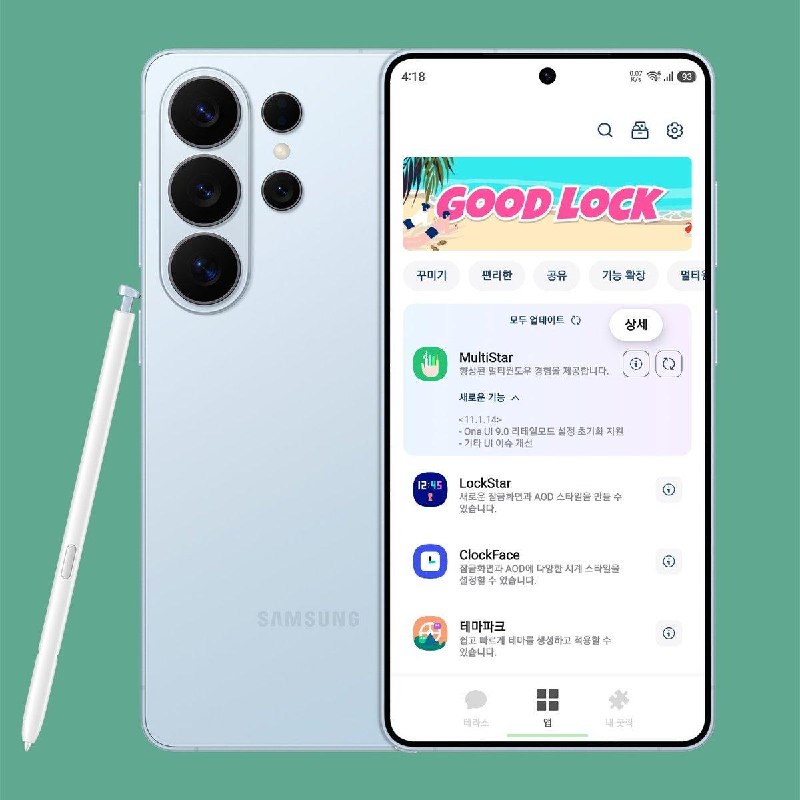
MultiStar App Receives Significant Update to Version 11.1.14 with Enhanced One UI 9.0 Support
Latest Brings Retail Mode Settings Reset and UI Improvements for Samsung Device Enthusiasts
The popular MultiStar application, developed by renowned Samsung community member tarunvats, has been updated to version 11.1.14, introducing several important enhancements that improve compatibility with Samsung's latest One UI 9.0 software. This update represents a significant milestone for users who rely on this powerful tool to optimize their Samsung device experience.
The update arrives at a crucial time as Samsung continues to roll out One UI 9.0 to various device models worldwide. MultiStar has established itself as an essential utility for Samsung power users, offering a suite of features that extend the capabilities beyond standard device limitations.
What is MultiStar?
MultiStar is a specialized application designed specifically for Samsung devices running One UI. It provides users with advanced customization options, performance tweaks, and system-level modifications that are not available through standard settings. The app has gained significant popularity among Samsung enthusiasts and developers who seek greater control over their device's functionality and appearance.
Developed with the Samsung community in mind, MultiStar regularly receives updates to maintain compatibility with new versions of One UI and to introduce new features requested by its user base. The application has become a cornerstone in the Samsung customization ecosystem.
Key Features of MultiStar v11.1.14
The latest version introduces several important improvements that enhance both functionality and user experience:
- One UI 9.0 Retail Mode Settings Reset: The update now fully supports the Retail Mode settings reset functionality for devices running One UI 9.0. This feature is particularly important for retail environments where devices need to be quickly returned to their default demonstration state.
- UI Improvements: The development team has addressed various UI inconsistencies and enhanced the overall user interface, making navigation more intuitive and responsive.
- Enhanced Compatibility: Improved compatibility with the latest Samsung devices and One UI 9.0 ensures broader device support.
- Performance Optimizations: Under-the-hood improvements contribute to faster loading times and reduced resource consumption.
- Bug Fixes: Resolution of several minor issues reported by the community since the previous version.
Understanding One UI 9.0 Retail Mode
Retail Mode is a specialized configuration designed for Samsung devices displayed in retail environments. When activated, it limits functionality to specific features suitable for customer demonstrations while preventing access to personal data and settings. The new MultiStar update enhances the ability to reset these Retail Mode configurations, which is particularly valuable for:
- Retail store employees who need to quickly reset demo units
- Enterprise environments where devices are shared among multiple users
- Developers testing applications in controlled demonstration scenarios
The improved Retail Mode settings reset functionality in MultiStar v11.1.14 provides a more reliable and efficient way to restore devices to their retail demonstration state without requiring complex manual procedures.
Technical Improvements and Version Comparison
Beyond the headline features, MultiStar v11.1.14 includes numerous technical refinements that enhance stability and performance. The development team has focused on optimizing resource usage and improving the application's compatibility with Samsung's latest security patches and system modifications.
The following table provides a comparison between the previous version and the current update:
| Feature | Version 11.1.13 | Version 11.1.14 |
|---|---|---|
| One UI 9.0 Support | Limited compatibility | Full support with Retail Mode enhancements |
| UI Responsiveness | Standard performance | Improved with faster navigation |
| Retail Mode Reset | Basic functionality | Enhanced with more reliable reset options |
| Resource Consumption | Moderate | Optimized for lower memory usage |
| Bug Resolution | Previous issues present | Multiple community-reported issues fixed |
The Developer's Vision
tarunvats, the developer behind MultiStar, has been an active contributor to the Samsung customization community for several years. The latest update reflects their commitment to maintaining compatibility with Samsung's evolving software ecosystem while responding to user feedback and requests.
"The focus for this update was ensuring seamless integration with One UI 9.0 while enhancing the Retail Mode functionality that many of our users depend on," tarunvats shared in the update announcement. "We're grateful to the community for their continued support and valuable feedback that helps shape the direction of MultiStar."
Impact on the Samsung Community
The release of MultiStar v11.1.14 has been well-received by the Samsung enthusiast community. The application has become an essential tool for device customization, and regular updates ensure its continued relevance as Samsung releases new software versions.
For users who regularly customize their Samsung devices, this update provides enhanced functionality and improved reliability. The improved Retail Mode support is particularly valuable for those who use their devices in demonstration or shared environments.
Installation and Update Process
Users can update MultiStar to version 11.1.14 through various channels, including the official Samsung Galaxy Store or third-party application repositories that host the APK. The update process is straightforward and typically involves:
- Downloading the latest version of MultiStar
- Installing the update while preserving existing settings and configurations
- Restarting the application to access new features
For new users, MultiStar can be installed on any Samsung device running a compatible version of One UI. The application requires certain permissions to function properly, which are clearly explained during the installation process.
Conclusion: A Significant Step Forward for Samsung Customization
The MultiStar v11.1.14 update represents an important milestone in the application's development, offering enhanced compatibility with One UI 9.0 and improved functionality for Retail Mode operations. For Samsung enthusiasts and power users, this update provides valuable tools to further customize and optimize their devices.
As Samsung continues to evolve One UI, applications like MultiStar play a crucial role in extending the capabilities of Samsung devices beyond standard limitations. The ongoing development and regular updates demonstrate the developer's commitment to maintaining relevance and responding to the needs of the Samsung community.
With this latest release, MultiStar solidifies its position as an essential utility for anyone looking to maximize their Samsung device's potential through advanced customization options and system-level modifications.
MultiStar app gets an update to v11.1.14 What's new - Support for One UI 9.0 Retail Mode Settings Reset - Improvement of other UI issues Apk https://gofile.io/d/1x03uS via: tarunvats ❤️ @OneUIForGalaxy MultiStar app gets an update to v11.1.14 What's new - Support for One UI 9.0 Retail Mode Settings Reset - Improvement of other UI issues Apk https://gofile.io/d/1x03uS via: tarunvats ❤️ @OneUIForGalaxy


