 TechOffice
Mac Productivity Revolution: The External Keypad Changing How We Work
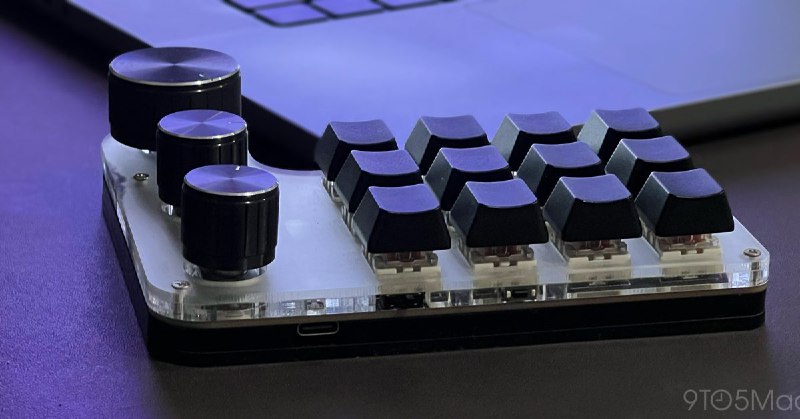
The Indispensable Mac Keypad: How a Small Peripheral Revolutionizes Productivity
In the world of computing peripherals, some tools make such a profound impact on daily workflows that users wonder how they ever managed without them. For many Mac professionals, a simple external keypad has become that essential tool—a compact yet powerful addition that transforms how they interact with their machines. This article explores why an increasing number of Mac users are declaring their keypad as indispensable.
The Evolution of Mac Input Methods
Since the introduction of the original Macintosh in 1984, Apple has consistently designed its keyboards with a focus on minimalism and aesthetics. While this approach has yielded some of the most beautiful keyboards in the industry, it has often come at the expense of functionality. The omission of a dedicated numeric keypad on most MacBook models and many Apple keyboards has left a gap for users who frequently work with numbers.
As Macs have evolved into serious machines for professionals in finance, programming, design, and data analysis, the need for efficient numeric input has grown. This demand has spurred the development of third-party keypads specifically designed to complement Apple's ecosystem while addressing these functional gaps.
Why a Separate Keypad?
The benefits of adding a dedicated keypad to a Mac setup extend far beyond simple numeric entry. For professionals who spend hours entering data, performing calculations, or navigating spreadsheets, the efficiency gains are substantial.
- Enhanced Numeric Entry: Dedicated number pads allow for faster, more accurate data input compared to using the top row number keys.
- Reduced Finger Movement: Having numbers clustered together eliminates the need to stretch across the keyboard, reducing strain and increasing speed.
- Ergonomic Benefits: Proper positioning of a keypad can create a more comfortable typing posture, potentially reducing repetitive strain injuries.
- Specialized Functions: Many modern keypads include programmable keys, calculator functions, and customizable shortcuts tailored to specific workflows.
Popular Mac-Compatible Keypad Models
The market for Mac-compatible keypads has expanded significantly in recent years, with manufacturers offering a range of options to suit different needs and budgets. Below is a comparison of some leading models:
| Model | Connectivity | Programmable Keys | Special Features | Price Range |
|---|---|---|---|---|
| Brydge Numeric Keypad | Bluetooth | Yes | Wireless, rechargeable | $49.99 |
| Adomax Numeric Keypad | USB/Bluetooth | No | Dual connection modes | $29.99 |
| Logitech K780 Multi-Device | Bluetooth | Yes | $59.99 | |
| USB | No | $19.99 |
Professional Use Cases
The value of a dedicated keypad becomes most apparent in specific professional contexts where numeric input is frequent or critical.
Financial and Data-Intensive Work
For accountants, financial analysts, and data scientists, a keypad is not just a convenience—it's a necessity. The ability to rapidly enter numbers, perform calculations, and navigate spreadsheets without shifting hand positions dramatically improves workflow efficiency. Financial modeling, budget analysis, and data entry tasks that might take hours without a keypad can be completed in significantly less time with one.
Programming and Development
Many programmers find that a keypad enhances their coding experience, particularly when working with languages or frameworks that require frequent numeric input. Whether it's entering array indices, numerical parameters, or ASCII codes, having a dedicated number pad reduces context switching and keeps hands in optimal positions.
Creative Work
Surprisingly, many designers and creative professionals have adopted keypads to enhance their workflows. Graphic designers often use keypads for precise input of measurements and values in design software. Video editors find them useful for timecode entry and frame navigation, while musicians use them for inputting musical notes and values in digital audio workstations.
Setting Up and Customizing Keypads
Modern Mac-compatible keypads offer various setup options to suit different preferences and workflows.
Connection Methods
- USB Connection: The most straightforward option, requiring no pairing or charging. Simply plug in and start working.
- Bluetooth Connection: Offers greater flexibility in positioning and reduces cable clutter. Most Bluetooth keypads feature simple pairing processes with Macs.
- Dual-Mode Keyboards: Some models support both USB and Bluetooth connections, providing maximum versatility.
Software Configuration
While many keypads work immediately upon connection, advanced users can often enhance their functionality through software:
- Programmable key mapping using third-party utilities
- Creating custom keyboard shortcuts
- Setting up application-specific profiles
- Adjusting key repeat rates and sensitivity
Future of Mac Keypads
As Apple continues to refine its ecosystem and professionals demand more specialized tools, keypads are likely to evolve in several directions:
- Integration with Apple's ecosystem features like Universal Control
- Enhanced haptic feedback and improved key mechanisms
- Greater emphasis on sustainability and eco-friendly materials
- Development of industry-specific keypads with specialized functions
Conclusion: Is a Keypad Right for You?
For Mac users whose work involves frequent numeric input, a dedicated keypad can transform productivity and comfort. The efficiency gains, ergonomic benefits, and specialized functionality make it an investment that pays dividends daily. While not essential for all users, those who regularly work with numbers, data, or specialized applications may find that adding a keypad to their Mac setup is one of the most impactful upgrades they can make.
As one user aptly summarized: "Once you integrate a keypad into your workflow, you realize what you've been missing. It's not about adding more hardware—it's about creating a more efficient, comfortable, and powerful computing experience."
I can’t work on my Mac without this little keypad anymore https://ift.tt/NT4nzqj I can’t work on my Mac without this little keypad anymore https://ift.tt/NT4nzqj


