 TechOffice
Exciting Release: One UI 9 Now Available for Home Users! 🔥
Exciting Update: Home Up for One UI 9 Now Available on Galaxy S26 Ultra
In a much-anticipated announcement, the Home Up v18.0.00.24 has officially launched, bringing a host of new features to the Galaxy S26 Ultra. This latest version of the user interface component for One UI 9 promises to enhance user experience through innovative functionalities and customization options.
New Features of Home Up v18.0.00.24
The newest iteration of Home Up introduces several upgrades that cater to users looking for more personalization and ease of use. Two standout features include:
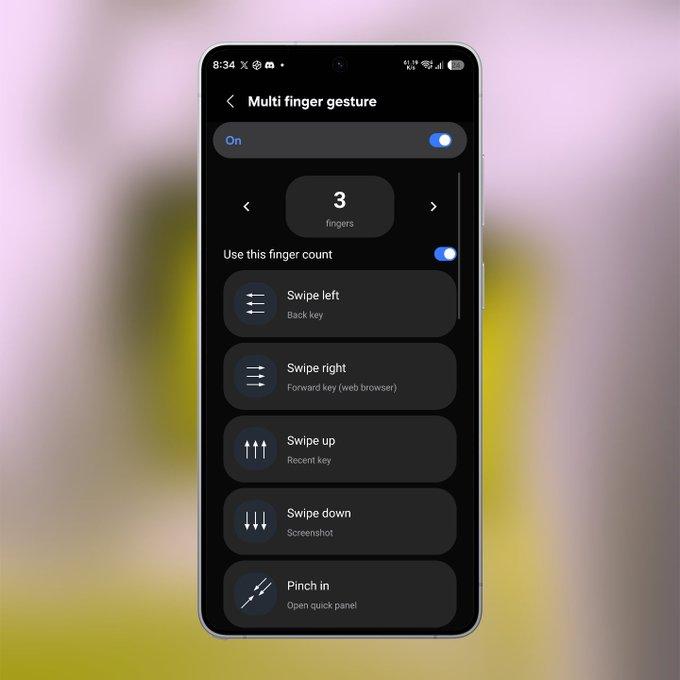
- Multi-Finger Gestures: Users can now make use of multiple finger gestures, including a highly requested three-finger screenshot feature. This functionality can be fully customized, allowing users to tailor it to their preferences.
- Favorites (Dock) Background Customization: Home Up now enables users to personalize the dock’s background with options such as blur effects, shadow settings, and custom colors. This allows for a more tailored aesthetic that matches individual tastes.
A Note on Accessibility
It is important to note that, despite these exciting features, Home Up currently does not appear within the Good Lock app. Users who wish to access these new functionalities will need to follow a specific pathway:
- Navigate to your Home Screen.
- Long press on an empty area.
- Select Settings.
- Then choose More Customisations.
This method allows users to access Home Up and explore the new features at their convenience.
Conclusion
The arrival of Home Up v18.0.00.24 marks a significant advancement for One UI 9 users on the Galaxy S26 Ultra. With the addition of multi-finger gestures and enhanced customization options for the Favorites dock, users can enjoy a more dynamic and personalized experience. As Samsung continues to roll out updates that focus on user preferences and personalization, it is clear that the company is committed to enhancing user engagement and satisfaction.
Feature Summary
| Feature | Description |
|---|---|
| Multi-Finger Gestures | Includes customizable three-finger screenshot capability. |
| Dock Background Customization | Allows users to apply blur effects, shadows, and custom colors to the Favorites dock. |
| Accessibility | Currently does not appear within the Good Lock app; accessible through Home Screen settings. |
This update is poised to elevate user experience, and we encourage Galaxy S26 Ultra users to explore the new Home Up features and embrace the customization opportunities available.
BREAKING - Home Up for One UI 9 is finally here! 🔥 Home Up v18.0.00.24 is now available on the Galaxy S26 Ultra. ✨ New features: ✅ Multi-finger gestures (including 3-finger screenshot with full customization) ✅ Favorites (Dock) background customization (Blur, Shadow & Custom colors and background) ⚠️ Note: Home Up won't appear inside the Good Lock app yet. To open it: Home Screen → Long press → Settings → More customisations APK: https://t.co/rKhuqTLCqD ❤️ @OneUIForGalaxy BREAKING - Home Up for One UI 9 is finally here! 🔥 Home Up v18.0.00.24 is now available on the Galaxy S26 Ultra. ✨ New features: ✅ Multi-finger gestures (including 3-finger screenshot with full customization) ✅ Favorites (Dock) background customization (Blur, Shadow & Custom colors and background) ⚠️ Note: Home Up won't appear inside the Good Lock app yet. To open it: Home Screen → Long press → Settings → More customisations APK: https://t.co/rKhuqTLCqD ❤️ @OneUIForGalaxy


