 TechOffice
One UI 9 Home Up Introduces Enhanced Customization for Dock Setup
Samsung Enhances User Experience with One UI 9’s New Dock Customization Feature
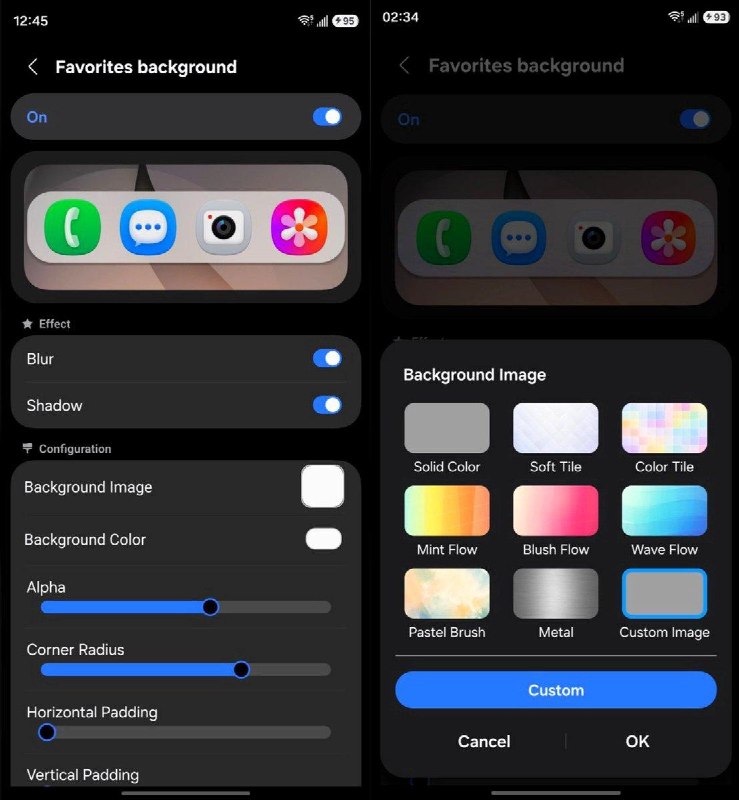
In a bid to further personalize the smartphone experience for its users, Samsung has unveiled a new feature in its One UI 9 Home Up update. This innovative addition, dubbed Favorites Background, empowers users to customize their docks, providing a range of visually appealing options tailored to individual preferences. This development not only enhances aesthetic appeal but also offers greater functionality, allowing users to curate their home screens more effectively.
Exploring the Features of Favorites Background
The Favorites Background feature allows users to transform the appearance of their home screen dock in several dynamic ways. These enhancements include:
- Dock Placement: Users can adjust the position of the dock on their screens, offering more flexibility and convenience based on how they interact with their devices.
- Blur Effects: The feature introduces a blurred background effect behind the dock, creating a sophisticated visual appearance that enhances the overall user experience.
- Shadow Effects: Adding shadow options provides a sense of depth, making the dock stand out against the home screen background.
- Image Integration: For those who want to add a personal touch, the ability to include images in the dock setup enables users to express their individuality.
- Color Styles: A selection of color palettes is available, allowing users to match the dock’s appearance with their overall theme or mood.
A Nod to iPhone's Visual Appeal
This update introduces a dock reminiscent of Apple's iPhone interface, yet it is distinguished by its high level of customization. Users can now enjoy the aesthetic qualities found in competing devices while benefiting from Samsung's signature adaptability.
| Feature | Description |
|---|---|
| Dock Placement | Adjustable positioning for user flexibility. |
| Blur Effects | Creates a visually appealing blurred background. |
| Shadow Effects | Adds depth to the dock’s appearance. |
| Image Integration | Allows users to include personal images. |
| Color Styles | Various palettes to match user preferences. |
User Response and Availability
The announcement of this feature first surfaced on social media when a user shared their discovery on Twitter, highlighting the excitement around the update. Its availability is already making waves among Samsung users, many of whom are eager to experiment with the new customization options.
Conclusion: A Step Toward Personalization
With the introduction of the Favorites Background feature in One UI 9, Samsung is once again demonstrating its commitment to enhancing the user experience. This update is a testament to the company’s focus on user-centric innovation, providing greater options for customization and personal expression. As technology continues to evolve, features like these ensure that users can enjoy personalized and engaging smartphone experiences.
By blending aesthetic appeal with functional customization, Samsung is setting a new standard for user interfaces in the mobile technology landscape.
Samsung has introduced a new feature in its One UI 9 Home Up update, allowing users to customize their dock setup to their liking. The new feature, named Favorites Background, provides a range of options to personalize the dock's appearance. Users can now change the placement, blur, shadow, add an image, and select from various color styles to create a unique dock that suits their preferences. This update brings a nice iPhone-like dock to Samsung devices, giving users more control over their home screen experience. The new feature was spotted by a user who shared it on Twitter, and it is now available for users to try out. With this update, Samsung is continuing to enhance the One UI experience and provide users with more options to personalize their devices. One UI 9 Home Up brings a customizable Dock Setup 🔥 Feature named as Favorites Background 📱 You can change placement, blur, shadow, add image and colour styles A nice iPhone-like dock, but customizable ✅ Via: @GalaxyTechie ❤️ @OneUIForGalaxy


